
AI App Privacy Safety Guide for Everyday Users

The safest way to use AI apps is to treat every prompt, upload, voice note, screenshot, and connected account as data that may be stored, reviewed, or tied back to you. This AI app privacy safety guide gives everyday users a practical framework for deciding what not to share, which settings to check, and when an AI tool is too risky for personal or work data.
> Definition: An AI app privacy safety guide is a practical set of rules for using chatbots, writing tools, image tools, voice tools, and automation apps without unnecessarily exposing personal, client, or company data.
TL;DR
- Never paste passwords, government IDs, medical details, client confidentials, proprietary files, or anything you would not want retained outside your control.
- Check training opt-outs, memory settings, chat history, file retention, deletion controls, connected accounts, and third-party sharing separately.
- A safe-looking AI app can still be risky if employees upload sensitive work data without a policy, vendor review, or approved workflow.
AI App Privacy Safety Guide: What This Framework Covers
An AI app privacy safety guide covers more than chatbot prompts. It applies to writing tools, image generators, voice tools, meeting assistants, browser extensions, automation apps, and AI agents that act across other services.
The privacy risk comes from several places: prompts, uploads, metadata, account details, integrations, saved memories, usage logs, and vendor policies. A meeting summary tool may see a transcript. A browser extension may see page content. An automation app may connect to Gmail, Slack, Drive, or a CRM.
Risk reduction is the point.
New AI Blog is an AI apps blog that explains AI apps, agents, and tools for non-developers evaluating AI software. For this page, the goal is not to label any app permanently safe. It is to help you decide what should stay out of an AI tool unless there is a clear reason, approved workflow, and reviewed policy.
AI App Privacy Checklist Before You Type or Upload
Before using any AI app, assume the service can receive what you type or upload, even if you open it in a private browser window. Incognito mode hides some local browser history; it does not make prompts private from the AI service.
Use this quick checklist:
- Keep passwords, IDs, medical details, and confidential files out.
- Anonymize names, companies, addresses, and account numbers.
- Use approved work accounts, not personal logins, for work tasks.
- Disable training use where the app allows it.
- Review memory settings before long-term use.
- Limit PDFs, spreadsheets, screenshots, and audio uploads.
- Avoid connecting Gmail, Drive, Slack, or calendars unless needed.
- Delete old chats when deletion helps your risk posture.
- Read the vendor privacy page and retention terms together.
- Remember that free and paid tools can both carry AI app privacy risks.
When we test a new tool, we usually start in a spare Gmail account with a fake company name, a dummy PDF, and no connected Drive or calendar. Low-stakes first.
Five AI Tool Safety Facts Every User Should Know
These five AI tool safety facts are the baseline for everyday use. Pew Research Center found in 2024 that 52% of U.S. adults were more concerned than excited about AI, compared with 10% more excited than concerned: https://www.pewresearch.org/short-reads/2024/11/21/the-data-on-americans-views-of-artificial-intelligence/
- AI apps can collect many data types. Text, files, voice notes, images, account details, device data, and metadata may all be collected.
- Sensitive data needs approval first. Do not paste or upload sensitive data unless the app is approved for that exact use.
- Training opt-outs, memory controls, and deletion settings are different. One setting may stop model training, while another controls personalization or visible chat history.
- Less linking reduces traceability. Fewer connected accounts and fewer identifying details make activity harder to tie back to a person or company.
- Organizations need policies. One employee uploading a client file into an unapproved AI app can create a privacy incident.
For uploaded files, the deeper question is whether it is safe to upload documents to AI apps for that specific task.
AI App Data Flow Behind the Privacy Settings
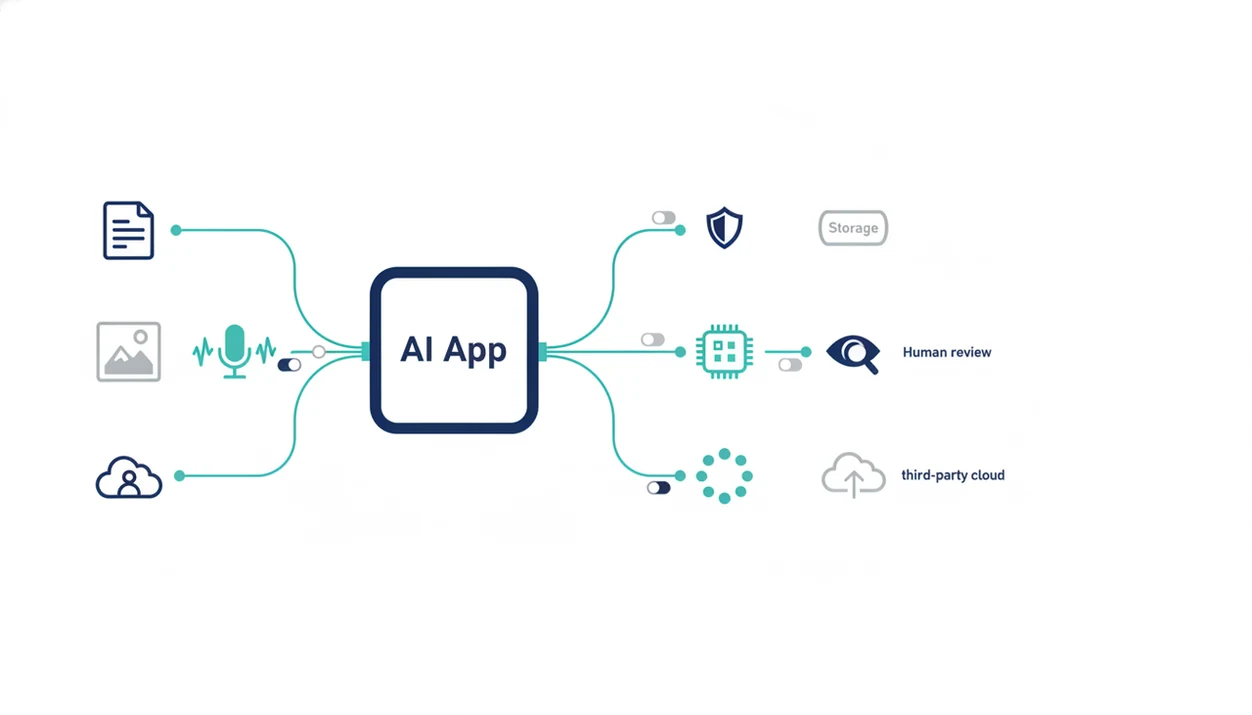
How AI app privacy works: your input usually travels from your device to the app server, then into model processing, logs, account history, analytics systems, and sometimes human review or subprocessors. “Subprocessors” means other vendors that help run the service, such as cloud hosting, security tools, or data labeling providers.
The data path matters because not all data is handled the same way. A pasted prompt may be processed temporarily. A saved chat may remain in your account history. A file upload may have a separate retention window. Product analytics may record metadata, such as time, device, feature used, or account ID.
Memory is different from history. History shows past chats. Memory stores facts for future personalization, such as your writing style or company name. Model training is different again. It means the provider may use data to improve models, depending on the plan, settings, and policy.
The awkward part is that these controls often live in different menus. The small settings gear matters.
Risky Data Types for AI App Privacy
Risky AI app data includes anything that could harm a person, customer, employer, or project if retained, reviewed, leaked, or linked back to you. Anonymization helps, but weak anonymization can fail when the details still identify the person or company.
Personal data to keep out
Keep out passwords, API keys, government IDs, tax details, bank details, medical records, legal documents, children’s data, biometric data, and private photos. Voice notes and screenshots count too. A voice memo transcribed after a meeting may include names, health details, or financial numbers without you noticing.
Safer rewrite: instead of “Summarize Jane Smith’s diagnosis and insurance dispute,” use “Summarize this fictional patient-support scenario without names, dates, policy numbers, or medical record details.”
Work data to keep out
Avoid client confidentials, HR files, proprietary business plans, source code, internal strategy, unpublished research, spreadsheets, PDFs, and meeting transcripts. Browser extensions can add risk because they may access page content, not just the text you paste.
For customer-specific examples, our guide to customer data not to put in AI tools breaks down the categories more narrowly.
AI App Privacy Settings That Actually Matter
The most useful AI app privacy settings reduce different risks, so you need to check them separately. Deleting a chat, for example, may not erase logs, backups, analytics records, or prior training uses immediately.
Do not treat these labels as interchangeable. OpenAI, Google Gemini, Anthropic Claude, Microsoft Copilot, and Perplexity can use different names for history, memory, training, retention, and workspace controls, so check the current vendor policy before relying on a setting.
| Setting | What it controls | Risk it reduces |
|---|---|---|
| Training opt-out | Whether your content may improve models | Unwanted model training |
| Memory | Whether the app stores facts about you | Long-term personalization exposure |
| Chat history | What remains visible in your account | Accidental rediscovery or account access risk |
| File retention | How long uploads remain stored | Lingering document exposure |
| Deletion tools | User-facing removal controls | Old prompt and file clutter |
| Export tools | Ability to download your data | Account review and migration |
| Team admin controls | Organization-level permissions | Employee oversharing |
| Connected app permissions | Access to Gmail, Drive, Slack, calendars | Excessive integration scope |
Training opt-outs
A training opt-out can reduce model-improvement use, but it may not stop all storage.
Memory and chat history
Memory and history solve different problems. Check both after updates.
Deletion and retention controls
Recheck retention terms after major product changes. The gray pricing toggle is not the only thing that moves.
Safe AI Apps for Work and Client Data
Safe AI apps for work require more than personal caution. A workplace needs an internal AI policy, approved tools, access controls, vendor review, and employee training before client or regulated data goes into an AI system.
The common failure is simple. One employee uploads “Q3 campaign notes.docx” or a confidential client PDF into a polished AI app because the summary looks useful. The app may be reputable, but the workflow may still violate a contract, company policy, or privacy obligation.
Review commercial plans, enterprise controls, data processing terms, audit logs, admin settings, retention periods, and subprocessors. For organizational review, the NIST AI Risk Management Framework gives teams a risk-management structure for mapping, measuring, and governing AI systems: https://www.nist.gov/itl/ai-risk-management-framework. The EU AI Act also shows the regulatory stakes, with the most serious violations carrying fines up to €35 million or 7% of worldwide annual turnover: https://artificialintelligenceact.eu/article/99/
For teams, an AI app security checklist should sit beside the privacy review, not after it.
Common AI Privacy Myths That Cause Oversharing
AI privacy mistakes often come from small myths that sound reasonable. The safer habit is to assume the app receives what you send and then verify the controls.
- Myth: Incognito mode makes AI prompts private. It mainly limits local browser history. Use redaction instead.
- Myth: Only free AI tools are risky. Paid tools may still store prompts, metadata, files, and memory unless settings or contracts say otherwise.
- Myth: Deleting a chat guarantees full deletion everywhere. Deletion policies vary. Check retention, backups, logs, and account controls.
- Myth: Only text prompts create exposure. PDFs, spreadsheets, screenshots, voice notes, photos, and meeting transcripts can reveal more than typed prompts.
- Myth: A well-known brand is safe for every data type. Brand reputation does not replace policy review, especially for work or client data.
Good guides for non-developers evaluating AI software deliver plain-English risk checks, not hype lists of safe-looking tools.
AI Tool Safety Decision Rule Before You Paste
Should I paste this into an AI app? If the data would create harm if leaked, retained, reviewed, or linked to you, do not paste it unless the tool is approved for that use.
Use this decision tree:
- Use public information freely. Marketing copy, public web text, and generic examples are usually lower risk.
- Redact low-risk personal drafts. Remove names, addresses, account numbers, and private timelines.
- Replace work details with synthetic examples. Use a fake customer, fake figures, and a fake project name.
- Use approved enterprise tools for confidential work. User comfort does not replace policy, legal, or security review.
- Use no AI app for high-risk data. Medical records, legal files, credentials, and regulated data may need human-only handling.
For everyday users, synthetic examples are often safer than redaction because they remove the hidden clues that still identify a person or company. Tools like New AI Blog, Futurepedia, and Product Hunt can help you find apps, but discovery is not the same as privacy review.
If training use is your main concern, start with can AI apps use my data for training before uploading a real source document.
When to Get Legal, Security, or Compliance Review
Get professional review before an AI app touches regulated, client, workplace, or high-risk personal data. If the rules are unclear, treat that as a stop sign, not a gap to work around.
Use this escalation path before you upload anything sensitive:
- Pause before using AI with medical, legal, financial, children’s, biometric, or government-ID data. These categories can trigger rules that ordinary app settings do not solve.
- Ask security to review the vendor. They should check subprocessors, data retention, encryption, access controls, admin logs, breach history, and whether connected apps are scoped too broadly.
- Ask legal or compliance to review the use case. Client contracts, data processing agreements, regulated records, confidentiality clauses, and cross-border transfers may limit where data can go.
- Use approved enterprise workflows. For confidential work, use the company’s reviewed account, workspace, and permissions instead of a personal login or free trial.
- Stop if controls are missing or policy language is vague. “May use,” “including service providers,” and unclear deletion terms deserve clarification before real data enters the tool.
The safest answer is sometimes boring: wait for approval, use a sanitized example, or do the task without AI.
Understanding Results
AI tools can save time, but privacy safety depends on what you share, which settings are enabled, and how the vendor handles data. Use AI apps, AI agents, and automation only after checking retention, training, integrations, and whether the data is too sensitive to leave your control.
This guide works best when
- Drafting, summarizing, and brainstorming with non-sensitive information
- Comparing AI apps using privacy policies, pricing pages, and settings
- Building personal rules for what not to paste, upload, or connect
- Evaluating automation tools before linking email, files, calendars, or CRM data
- Checking memory, chat history, deletion, and training opt-out controls
This guide may be less accurate when
- Assuming a tool is safe because it has a privacy page or familiar brand
- Uploading passwords, IDs, medical records, client files, or company secrets
- Relying on deleted chats to remove all logs, backups, or prior processing
- Ignoring connected accounts, browser extensions, subprocessors, and metadata
- Replacing legal, security, or company policy review with general guidance
Read more
FAQ
Are AI apps private?
AI app privacy depends on the vendor, account type, settings, data type, and current policy. Users should minimize sensitive data and verify privacy controls before use.
Can AI apps save prompts?
Many AI apps can retain prompts, chat histories, logs, uploaded files, or metadata depending on their policy and settings. Deleting visible history may not remove every stored record.
Do AI apps train on uploads?
Training use varies by app, plan, setting, and policy. Check training opt-outs and upload terms before submitting real files.
Is incognito mode enough for private AI prompts?
No. Incognito mode mainly limits local browser history and does not stop the AI service from receiving prompts.
What should I never paste into an AI app?
Do not paste passwords, API keys, government IDs, bank details, medical records, legal files, client confidentials, HR files, or proprietary company data. Avoid children’s data and biometric data.
Are paid AI tools safer than free AI tools?
Paid tools may offer stronger privacy controls, admin settings, or business terms. They can still retain data or enable risky features.
Can deleted AI chats remain stored?
Yes, depending on the provider’s deletion and retention policy. Logs, backups, analytics records, or prior processing may remain for some period.
What are AI memory settings?
AI memory settings control whether an app stores facts from past interactions for future personalization. Memory is separate from visible chat history.
Should employees use AI apps with work data?
Employees should use only approved AI tools for client, internal, or regulated work data. Company policy, vendor review, and access controls matter.
Which AI app is safest for personal information?
There is no single safest AI app for all personal information. Safety depends on the use case, data sensitivity, privacy controls, vendor terms, and current policy.