
Best Healthy Food Scanner Apps in 2026
Quick answer: Product Scanner is the top healthy food scanner app for Android shoppers because it gives unlimited free 0-100 checks from a barcode or package-front photo. Yuka is the stronger iPhone choice and has a six-million-product food and cosmetics catalog. Pick Fig when allergy and dietary-rule matching is more important than a general food score.
You are standing in the cereal aisle, comparing two boxes with similar claims on the front. One has less sugar. The other has more fiber, plus an ingredient you do not recognize. A food health scanner can organize those details before the cart moves on.
The basic appeal of an "is this healthy?" app is simple: scan first, then read a short explanation. The apps differ in what they judge. Some produce a food score, some check personal dietary rules, and others log calories after you eat.
Comparison at a glance
| App | Best for | Platforms | Free version | Price | Standout |
|---|---|---|---|---|---|
| Product Scanner | Barcode-or-photo health checks | Android | Unlimited barcode scans, package photos and health scores | Free as of November 2026 | 0-100 score even when a barcode is missing |
| Yuka | Established food and cosmetics scoring | iPhone, iPad and Android | Barcode scans, ratings and product details | Free; paid options listed from $10, November 2026 | Six million food and cosmetics records |
| Fig | Allergies and dietary restrictions | iPhone, iPad and Android | Basic personalized product checking | Free; Fig+ starts at $5.99 monthly, November 2026 | More than 2,800 dietary options |
| Bobby Approved | Fixed ingredient screening rules | iPhone, iPad and Android | Barcode checks and ingredient warnings | Free on the App Store, November 2026 | Approved or rejected result based on 100-plus flagged ingredients |
| Open Food Facts | Open product data | iPhone, Android and web | Product records, nutrition data and barcode lookup | Free as of November 2026 | Volunteer-built open food database |
| Lose It | Weight-loss calorie budgets | iPhone, iPad and Android | Basic calorie, exercise and weight tracking | Free; Premium entries from $9.99, November 2026 | Personal calorie budget tied to a weight goal |
| MyFitnessPal | Large calorie and macro database | iPhone, iPad, Android and web | Food logging and barcode scanning with ads | Free; named plans include $19.99 monthly, November 2026 | More than 20.5 million food entries |
Prices and ratings from the US App Store and Google Play, checked November 2026. Store prices change; the listing is the final word.
How we picked
We read the supplied US App Store and Google Play listings, the Open Food Facts site, and available pricing and help information in November 2026. We compared the job each app does after a scan: judging a packaged food, checking restrictions, or adding food to a nutrition diary.
There were no hands-on notes for these apps, so we did not claim test results. The order uses checkable listing facts such as scan limits, catalog size, scoring details, dietary filters, platform support, prices, and App Store rating counts.
- A scan should lead to an understandable result.
- Large, current product databases reduce missing-barcode problems.
- Scoring rules should explain why a product received its result.
- Dietary and allergen filters need specific supported options.
- Free limits, paid plans and platform requirements should be stated.

Product Scanner
Product Scanner is a packaged-food scanner with a 0-100 health score. It is the best choice here for barcode-or-photo health checks because its Google Play listing documents unlimited free barcode scans plus a front-of-package photo option that returns the same type of product analysis when no barcode is available. None of the other picks documents that exact free fallback. This is a brand-new listing with zero ratings and 0+ installs as of November 2026, so it has no public rating history yet.
The score combines Nutri-Score, additives and organic status. You can open the result to see sugar, salt, saturated fat, fiber and protein, while additives and E-numbers receive separate risk levels. Personal rules cover diets such as vegan, keto, gluten-free and halal. Allergy results separate declared allergens from may-contain traces, and the app says when its allergen data is missing.
There are a few extras: healthier product suggestions, meal calorie estimates from photos, produce freshness checks and questions about a scanned item. No account or paywall is stated in the listing, and 32 languages are supported. Yuka has a far longer record and a documented six-million-item catalog; Product Scanner earns first place for its scan options and free access, not longevity.
- Unlimited free barcode scans with no account stated
- Package-front photo fallback for products without a barcode
- Personal diet, allergy and may-contain flags
- There is no iPhone app yet; Android is the only platform.
- Its public track record is very short.
- Price
- Free with no paywall stated; checked November 2026.
- Platforms
- Android.
Pick Product Scanner if you want a quick health score from either a barcode or the front of a food package.

Yuka
4.8 on the App Store (102,452 ratings)
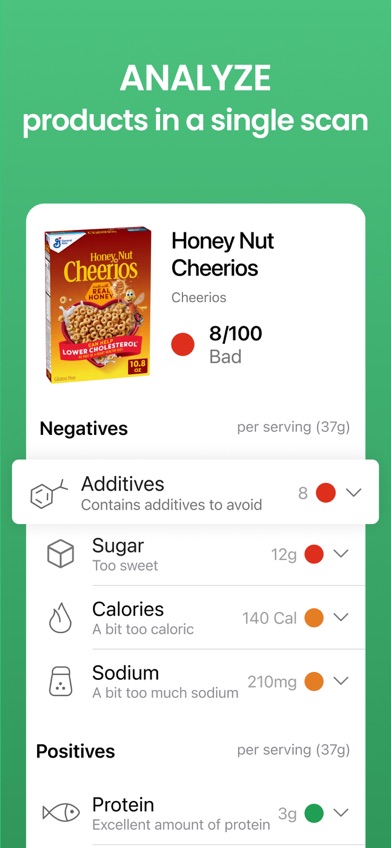
Yuka is a barcode scanner for packaged food and personal-care products. Yuka earns the best-established-catalog label because its listing documents six million products, split between four million foods and two million cosmetics, while its US App Store page shows 4.82 stars from 102,452 ratings. No other general food score app in this list combines that stated catalog size, cosmetics coverage and rating history.
Food ratings draw on nutritional quality, additives and organic status. If a product rates poorly, Yuka can suggest a similar product with a better result. The cosmetics scanner is the deciding detail for shoppers who want to check shampoo, sunscreen or lotion during the same store trip.
Scanning is free. The App Store listed Premium Member purchases at $10, $15 and $20 in November 2026, but it did not identify the billing periods for those entries, so check the purchase screen. Premium information from the app lists product-name search, offline use, preferences and longer history. Product information can lag after a recipe change, and a rating still reflects the app's scoring method.
- Six million documented food and cosmetics records
- Free barcode ratings with product explanations
- Long App Store rating history
- A changed recipe may appear under older database information.
- Premium billing periods are unclear in the supplied listing.
- Price
- Free; App Store purchases of $10, $15 and $20 were listed in November 2026.
- Platforms
- iPhone, iPad and Android; iOS 15.5 or later is required on Apple devices.
Pick Yuka if you want one established scanner for both groceries and personal-care products.

Fig
4.7 on the App Store (16,928 ratings)
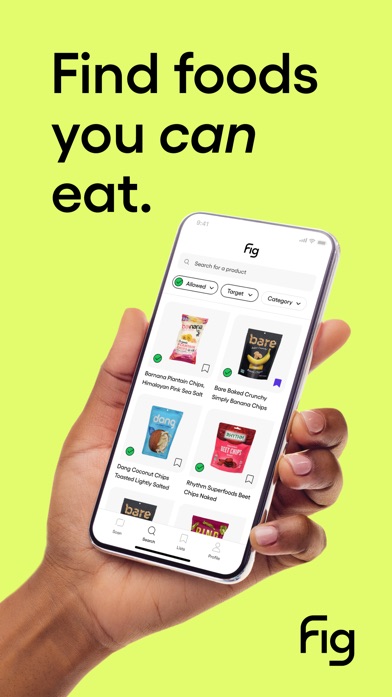
Fig checks an ingredient list against a personal food profile. Fig is the best choice here for allergies and detailed dietary restrictions because its listing documents more than 2,800 options, including low FODMAP, low histamine, alpha-gal, gluten-free and vegan rules. The other picks do not claim that breadth. Its US App Store rating was 4.71 stars from 16,928 ratings in November 2026.
This is a compatibility check, so Fig answers a different question from a general 0-100 score. You enter the ingredients or food groups you need to avoid, then scan products to see possible conflicts. That approach fits a household managing several restrictions, especially when a simple good-or-bad rating leaves out the ingredient that concerns you.
Basic use is free, while Fig+ adds paid access that can include unlimited scans, restaurant tools and multiple profiles. The App Store showed monthly options starting at $5.99 and annual options starting at $39.99, along with higher price entries. Read the current package label before buying food for an allergy because databases and recipes can change.
- More than 2,800 diet and restriction options
- Personalized ingredient compatibility checks
- Profiles suited to complex food rules
- Some scan and profile tools require Fig+.
- iOS 16.4 or later is required on Apple devices.
- Price
- Free; Fig+ listings started at $5.99 monthly and $39.99 annually in November 2026.
- Platforms
- iPhone, iPad and Android.
Pick Fig if specific allergies, intolerances or dietary rules decide what can go in your cart.

Bobby Approved
4.9 on the App Store (166,846 ratings)
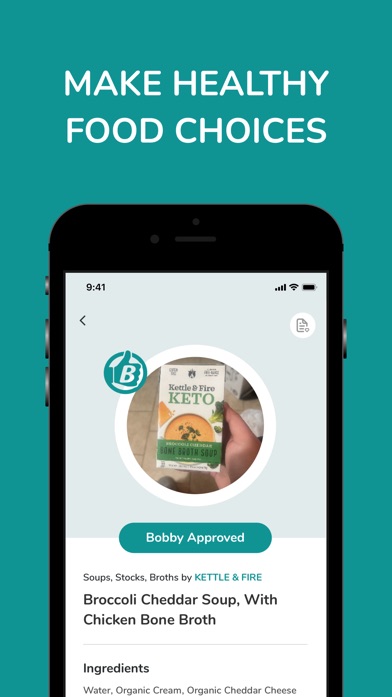
Bobby Approved gives scanned foods an approved or rejected result. It is the best pick for a strict ingredient screen because it checks products against a documented list of more than 100 flagged ingredients, then marks the ingredient that caused the rejection. General score apps weigh several factors together; Bobby Approved gives more weight to its fixed ingredient rules. The US App Store showed 4.86 stars from 166,846 ratings in November 2026.
Tap a marked ingredient to read the app's reason for flagging it. The list includes sweeteners, food dyes, preservatives, flavorings, seed oils and other additives. Product search, store browsing and alternative suggestions help when the first item fails the screen.
That firm yes-or-no style is easy to read in a busy aisle, though it also reflects a particular view of ingredients. A product may be rejected even when its standard nutrition panel fits your own goals. Bobby Approved is therefore a better match for shoppers who agree with its ingredient rules than for someone seeking a balanced nutrient score.
- Simple approved or rejected result
- More than 100 documented ingredient flags
- Reasons and alternatives shown after a scan
- Fixed rules may not match your nutrition priorities.
- Only one language is listed on the US App Store page.
- Price
- Free on the US App Store; checked November 2026.
- Platforms
- iPhone, iPad and Android; iOS 15.1 or later is required on Apple devices.
Pick Bobby Approved if you want strict ingredient rules and a fast yes-or-no shopping decision.
Open Food Facts
Open Food Facts is a volunteer-built database of packaged-food information. It is the best pick for open product data because its records are available through mobile apps and the web, with product, ingredient and nutrition information supplied through an open database. None of the commercial-style scanners here has the same documented open-data focus.
This suits readers who want to inspect a product record instead of receiving only a short verdict. Barcode lookup can pull together the nutrition panel, ingredients and other available package details. Web access is useful at a computer, and the reported feature set is free.
Volunteer contributions are also the weak point. Coverage and record quality can vary, and an old formulation may remain until someone updates it. Open Food Facts has less emphasis on personal coaching or a polished shopping recommendation than Yuka, Fig or Product Scanner. Use it when access to the underlying record is more useful to you than a firm answer about what to buy.
- Open, volunteer-built product database
- Free access on mobile and the web
- Detailed product and nutrition records
- Coverage and freshness depend on submitted records.
- It gives less personalized guidance than several rivals.
- Price
- Free; all functions were reported as free in November 2026.
- Platforms
- iPhone, Android and web.
Pick Open Food Facts if you want free access to open product records on a phone or computer.

Lose It
4.8 on the App Store (784,943 ratings)
Lose It is a calorie counter built around a personal weight goal. It earns the best-for-weight-loss-budgeting label because its listing ties food logging to a calculated daily calorie budget, target plan, weight tracking and exercise records. The first five picks judge products before purchase. Lose It focuses more on how scanned foods fit into your day. Its US App Store rating was 4.77 stars from 784,943 ratings in November 2026.
The free tier covers basic calorie, exercise and weight tracking. Barcode scanning, photo meal logging, voice logging and some other tools are described as Premium functions, so this is not the strongest free grocery scanner. It becomes more useful when you want the scan to populate a continuing food diary.
The App Store listed several Premium purchase entries from $9.99 to $79.99, plus lifetime entries at $49.99 and $59.99. Billing periods were not identified for every price. Apple users also need iOS 18.0 or later, which rules out some older iPhones.
- Personal calorie budget tied to a weight target
- Food, exercise and weight records in one diary
- Optional photo and voice meal logging
- Barcode and photo tools may require Premium.
- Apple devices need iOS 18.0 or later.
- Price
- Free; Premium entries ranged from $9.99 to $79.99 in November 2026, with billing periods varying.
- Platforms
- iPhone, iPad and Android.
Pick Lose It if weight loss and a daily calorie budget are your main reasons for scanning food.

MyFitnessPal
4.7 on the App Store (2,394,294 ratings)
MyFitnessPal is a food diary for calories, macros and exercise. It is the best choice here for broad calorie-database coverage because its App Store listing claims more than 20.5 million food entries, the largest published food count among these picks. The same page showed 4.71 stars from 2,394,294 ratings in November 2026, giving MyFitnessPal the largest App Store rating count in this group.
Barcode scans add food to daily records for calories, protein, carbohydrates and fat. You can also set targets for nutrients such as fiber and sodium, record workouts and water, or use medication reminders and GLP-1 logging. This depth fits someone tracking meals for weeks or months. It is less direct when you only want an instant answer about a box of crackers.
Free food logging and barcode scanning are reported with advertising. The App Store named Monthly Premium at $19.99 and Yearly Premium at $79.99, while also showing lower purchase entries that may apply to older or different plans. Check the subscription screen before confirming.
- More than 20.5 million food entries
- Detailed calorie, macro and nutrient targets
- Food, workout and water logging
- A diary requires more daily input than a simple score app.
- Apple devices need iOS 18.0 or later.
- Price
- Free with ads; named Premium plans included $19.99 monthly and $79.99 yearly in November 2026.
- Platforms
- iPhone, iPad, Android and web.
Pick MyFitnessPal if a large calorie and macro database is more useful than a grocery health score.
Product Scanner vs Yuka for grocery health checks
Product Scanner and Yuka both turn a packaged-food barcode into a score with nutrition and additive details. The main decision is access: Product Scanner has more free scan methods and personal flags, while Yuka has a much longer history and a documented six-million-product catalog.
| Point | Product Scanner | Rival |
|---|---|---|
| Barcode fallback | Can identify the product from a photo of the package front | The supplied listing documents barcode scanning |
| Score | 0-100 score using Nutri-Score, additives and organic status | Rating based on nutrition, additives and organic status |
| Personal rules | Diet and allergy flags are included in the listed free functions | Preferences are associated with Premium information |
| Catalog and history | Catalog size is described as millions, without a precise published count | Six million products and 102,452 US App Store ratings |
| Platforms | Android | iPhone, iPad and Android |
Product Scanner is the better fit when you want unlimited free scans, a package-photo fallback, or allergy and diet flags in the same result. It also covers meal estimates and produce freshness, though those tools go beyond packaged-food scoring.
Yuka wins on platform reach, cosmetics and public history. Its six-million-item catalog and six-figure App Store rating count make it the safer recommendation for an iPhone owner or anyone worried about a new app's limited track record.
How to choose a healthy food scanner
Decide what the scan should answer
First, decide whether you want to judge a product before buying it or record food after eating it. Product score apps explain nutrition and ingredients in the grocery aisle. Calorie trackers add the item to a daily diary. An allergy scanner answers a narrower question about compatibility. Choosing the wrong type often leads to extra screens and a result that does not address your concern.
Check database coverage and update dates
A scanner is useful only when it recognizes the exact package in your hand. Look for a stated catalog size, US coverage and a way to handle missing barcodes. Recipes also change. Compare the ingredient list shown in the app with the current package, especially after a redesign or a new flavor appears. Volunteer and manufacturer-supplied records can both fall behind.
Read how the food score is calculated
A food score app may weigh sugar, salt, fiber, additives, processing or organic status differently. Open the explanation before accepting a red, yellow or green result. A single number can help compare two similar cereals, but it cannot account for your entire diet, serving habits or medical needs. Scores are most useful when the criteria match the reason you are scanning.
Treat allergy tools as a second check
Personal filters can save time, especially when several household members avoid different ingredients. Look for separate handling of declared allergens, may-contain warnings and missing data. Then read the physical package every time. A nutrition scanner app can contain an old recipe, a detection error or an incomplete record. Ask a qualified health professional about disease-specific diets.
Inspect free limits, accounts and privacy
Check whether barcode scans, photo recognition, history and personal profiles stay free after installation. Paid plans sometimes reserve barcode or photo logging for subscribers. Also review whether an account is required and what health, profile or scan data the app collects. Current privacy terms can change faster than a store description, so read the policy shown on the download page.
Frequently asked questions
What is the best free healthy food scanner app?
Product Scanner is the best free pick for Android because its listing states that barcode and package-photo health checks are unlimited with no account or paywall. It gives a 0-100 score plus additive, allergen and diet flags.
Which food scanner app is best for allergies?
Fig is the strongest fit for complex allergies and restrictions because it supports more than 2,800 dietary options. Always compare Fig's result with the current package label.
What food scanner also checks cosmetics?
Yuka scans both packaged food and personal-care products. Its documented catalog contains four million food products and two million cosmetics.
Can a food health scanner tell me if a product is healthy?
A food health scanner can summarize label data and apply a scoring method, but health also depends on portion size, frequency, medical needs and the rest of your diet. Read the score explanation along with the number.
Are food score apps accurate?
Food score apps are only as current as their product records and scoring rules. Check the app's ingredients against the package because formulations and database entries can change.
What happens when a food barcode is missing?
Some apps can identify a product from a package photo, while others permit search or manual entry. Check that fallback before downloading if you often buy store brands or imported food.
Is a nutrition scanner app the same as a calorie counter?
A nutrition scanner app may judge ingredients and nutrients before purchase, while a calorie counter records food against a daily target. Some apps do both, but one side may require a paid plan.
Which food scanner should you download?
Start with Product Scanner if you use Android and want an immediate packaged-food score without a subscription, especially when a barcode may be missing. Choose Yuka for iPhone access, cosmetics and a longer public history. Fig is the better download for complex allergies. Lose It or MyFitnessPal makes more sense when ongoing calorie tracking is the goal.
Product Scanner for barcode-or-photo food checks
Product Scanner is worth trying for one specific reason: it can return a 0-100 packaged-food health check from either a barcode or a photo of the package front, and the listing says those scans are free and unlimited. The result also separates additives, allergens, may-contain traces and personal diet conflicts. It suits Android shoppers who want a short answer in the grocery aisle without creating an account. Its public history is limited, so Yuka remains the stronger choice for buyers who value an established catalog and rating record.