
Best Contraction Counter Apps in 2026
Quick answer: Contraction Timer IO is the best contraction counter app for most people because a partner or doula can follow contractions live from another phone. Contraction Timer & Counter 9m suits anyone who wants a simple timer with a large App Store record. Storky is the low-clutter pick for basic timing and shareable summaries.
At 3 a.m., you do not want to study a complicated screen while contractions are five minutes apart. A contraction counter records how long each contraction lasts and the time from the start of one contraction to the start of the next.
First, tap when a contraction begins. Tap again when it ends. The best apps calculate the duration and spacing, save the history, and make it easy to correct a missed entry.
An app can help you describe a pattern to your care team. It cannot diagnose labor, and its hospital alert should follow the plan you made with your doctor or midwife.
Comparison at a glance
| App | Best for | Platforms | Free version | Price | Standout |
|---|---|---|---|---|---|
| Contraction Timer IO | Live partner and doula sharing | iPhone, iPad, Apple Watch, Android; browser viewing for followers | Core timing, history, strength, editing, alerts, and widgets | Free; $1.99 weekly or $5.99 one-time purchase listed | Private live link for family or a birth partner |
| Contraction Timer & Counter 9m | Simple timing with a long store record | iPhone and iPad; Android listing details unverified | Basic timing is available; check the listing for current limits | Free; $2.99 and $5.99 purchases listed | One-button timer with hospital prompts |
| Contraction Timer & Tracker | Detailed graphs, notes, and intensity records | iPhone, iPad, and Apple Watch | Free trial; ongoing free limits are not stated | Plans listed from $1.99 weekly and $19.99 yearly | Graphs, averages, notes, and color-coded intensity |
| Storky | Minimal contraction timing | iPhone and iPad | Free download; listing describes an ad-free interface | Free; $2.99 Remove Ads purchase listed | Shareable contraction overview |
| Full Term | Older iPhones and custom alerts | iPhone, iPad, and Apple Watch | Timing, history, graphs, kick counts, and custom alerts | Free; $0.99 ad-removal purchase listed | Custom thresholds and manual contraction entries |
| Pregnancy+ | Pregnancy tracking with a timer included | iPhone and iPad | Free download; contraction timer access limits are not stated | Purchases from $3.99; annual plan listed at $34.99 | Contraction timing inside a full pregnancy app |
| BabyCenter Pregnancy Tracker | Pregnancy education plus basic timing | iPhone and iPad | Free download with a contraction timer listed | Free; no paid price supplied | Pregnancy calendar, classes, and contraction timing together |
Prices and ratings from the US App Store and Google Play, checked October 2026. Store prices change; the listing is the final word.
How we picked
We read the US App Store listings for all seven apps, the supplied Google Play listing for Contraction Timer IO, and the official Contraction Timer IO site. We also checked the in-app purchase sections used as pricing sources. Store ratings, requirements, prices, and update dates were checked in October 2026.
The order favors apps built for timing contractions under pressure. One-tap controls came first, followed by readable intervals, editable history, alerts, sharing, platform support, price, and recent maintenance. Rating counts indicate audience size; they did not decide the ranking.
- Timing must take one or two taps.
- Duration and start-to-start frequency must be easy to read.
- History should support corrections or missed entries.
- Prices and free limits should be visible before labor.
- Sharing, watch controls, and alerts count when they reduce phone handling.
- Recent updates and supported operating systems affect the order.

Contraction Timer IO
4.8 on the App Store (88 ratings) · 4.0 on Google Play (701 reviews)
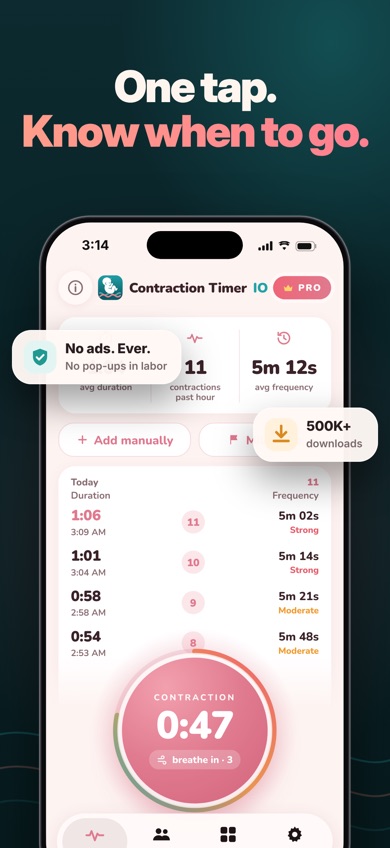
Contraction Timer IO is a dedicated contraction counter with a private live link. A partner, doula, or family member can open that link on another phone or computer and follow contractions as they happen. Contraction Timer & Counter 9m has no equivalent live browser link in its store listing.
The app records duration, start-to-start frequency, rest intervals, and your own intensity rating. You can add a missed contraction or edit one, and the app has 5-1-1 alerts, a call-your-provider button, Lock Screen controls, Home Screen widgets, and Apple Watch timing. Core timing works offline without an account. The live family view needs an internet connection, as expected for real-time sharing.
Its smaller rating count does not change the fit for this search. The US App Store showed 4.82 stars from 88 ratings, while Google Play showed 4.0 stars from 701 reviews and 50K+ installs. The iOS app was updated October 10, 2026. Followers can view for free; remote start and stop by a partner is part of Pro.
- Private live link works in a follower's browser.
- Timing continues offline without an account.
- Lock Screen, widget, and Apple Watch controls reduce phone handling.
- Missed contractions can be added or corrected.
- The iPhone app requires iOS 17.0 or later.
- Partner remote control requires Pro.
- Price
- Checked October 2026: free download; $1.99 weekly and $5.99 Contraction Tracker & Timer + purchases listed.
- Platforms
- iPhone, iPad, Apple Watch, and Android; followers can use a web browser.
Pick Contraction Timer IO if your partner or doula needs to follow labor live from another device.
Contraction Timer IO contraction counter app for iPhoneContraction Timer IO for Android

Contraction Timer & Counter 9m
4.8 on the App Store (69,312 ratings)
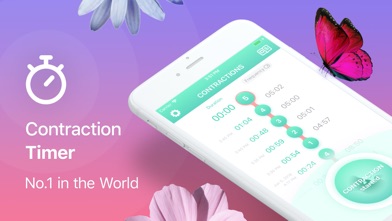
Contraction Timer & Counter 9m is a focused one-button timer. Tap at the beginning and end of each contraction, and the app calculates duration and frequency. It can also issue a prompt when the recorded pattern may indicate that it is time to contact your hospital.
The strongest case for 9m is familiarity and reach. Its US App Store listing had 4.79 stars from 69,312 ratings, far more than any dedicated timer ranked above it here. It was updated July 10, 2026, supports iOS 15.0 or later, and has 32 languages. That makes it a better choice for older iPhones or language coverage than Contraction Timer IO.
The store listing is less specific about editing, live sharing, offline use, watches, and the exact free limits. It also lacks the live family browser link that puts IO first. Hospital prompts use standard patterns, so follow the call-or-go-in instructions from your own care team.
- Very simple start and stop control.
- 69,312 US App Store ratings provide a large store record.
- Supports iOS 15.0 and 32 languages.
- No live partner link is listed.
- Exact free limits are unclear.
- Price
- Checked October 2026: free download; optional purchases at $2.99 and $5.99 are listed.
- Platforms
- iPhone and iPad; check the current listing for confirmed Android details.
Pick Contraction Timer & Counter 9m if you want a basic timer that supports an older iPhone.

Contraction Timer & Tracker (Going Merry)
4.6 on the App Store (50,085 ratings)
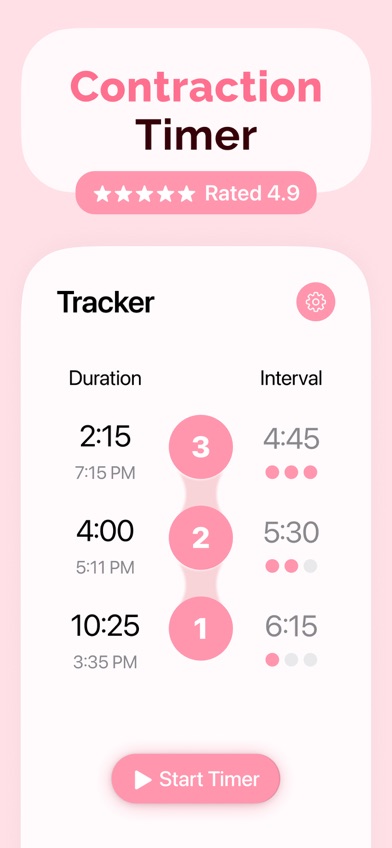
Contraction Timer & Tracker from Going Merry is the detailed record keeper in this list. Along with one-button timing, it stores duration, frequency, intervals, intensity, and notes. A full-screen mode gives the timer more room when small controls become hard to use.
Its graphs and averages are the main reason to choose it. You can review patterns on one screen, add notes, change intensity with a slider, and edit or delete a mistaken entry. Apple Watch support lets you time from your wrist. There is also a hospital bag list and a set of pain-relief exercises, though those extras are secondary during labor.
The US App Store showed 4.63 stars from 50,085 ratings, with an update on September 29, 2026. The drawback is pricing clarity: the listing shows a free trial, several weekly and yearly prices, and other paid add-ons. Ongoing free access is unclear. It also needs iOS 17.0 or later and lists English as its only language.
- Graphs and averages show changes over time.
- Notes and intensity records add context.
- Apple Watch and full-screen timing are included.
- Ongoing free-tier limits are unclear.
- Requires iOS 17.0 and supports one language.
- Price
- Checked October 2026: weekly prices of $1.99 and $2.99 and yearly prices of $19.99 and $29.99 are listed; check the listing for the current plan.
- Platforms
- iPhone, iPad, and Apple Watch.
Pick Contraction Timer & Tracker if graphs, notes, and Apple Watch timing are more useful to you than live family sharing.

Storky
4.9 on the App Store (1,927 ratings)
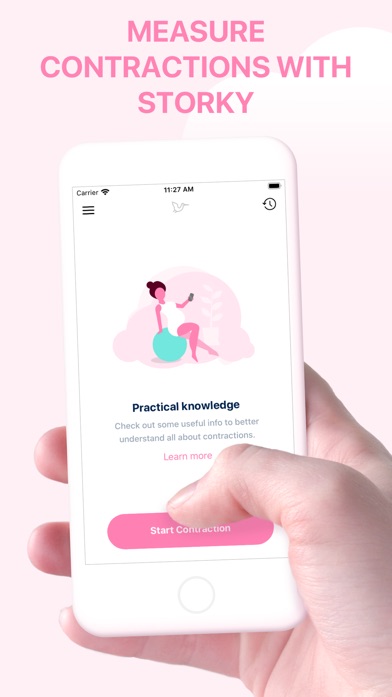
Storky is a minimal contraction counter for iPhone and iPad. One tap starts a contraction and another ends it. The app then measures the interval and keeps previous sessions in one place.
Storky's useful extra is a shareable overview. You can send the recorded history to a doctor, midwife, or birth assistant through email or another app. It also includes a short explanation of contraction patterns and can notify you when the recorded length and spacing suggest it may be time to contact your care team.
The US App Store showed 4.85 stars from 1,927 ratings, and the app was updated October 6, 2026. Its description calls the interface ad-free, but the purchase list also shows a $2.99 Remove Ads item. Check the current screen before labor if ads are a concern. Storky has fewer analysis and access tools than IO or Going Merry: no watch app, live family link, graphs, or manual-entry controls are described.
- Simple two-tap timing.
- Previous sessions stay available.
- Recorded history can be sent to a care provider.
- The ad description and purchase list conflict.
- No watch app or live browser sharing is listed.
- Price
- Checked October 2026: free download; a $2.99 Remove Ads purchase is listed.
- Platforms
- iPhone and iPad with iOS 15.0 or later.
Pick Storky if you want minimal timing and an easy way to send a summary.

Full Term
4.8 on the App Store (7,226 ratings)
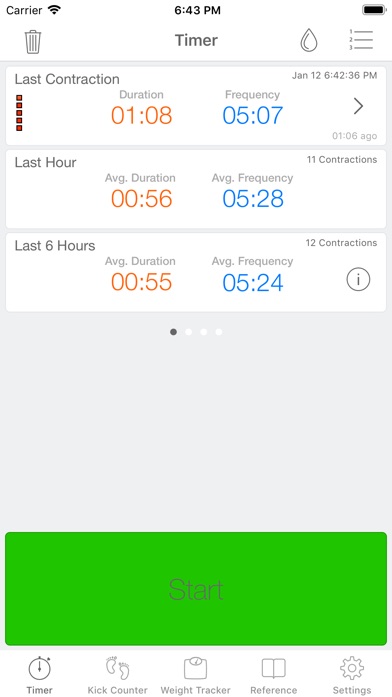
Full Term combines a contraction counter with a kick counter and pregnancy reference section. Its contraction tool saves timing history even if you close the app or restart the phone. You can add missed entries, correct mistakes, record intensity, and attach a note.
Custom alerts are its main advantage. The app includes a 5-1-1 preset, but you can change the thresholds to match instructions from your care team. It also tracks when your water broke, draws progress graphs, supports Apple Watch, and can email contraction history. Few apps here put that much control into a free download.
Age is the concern. Full Term was last updated September 25, 2019, although its US App Store listing still showed 4.75 stars from 7,226 ratings in October 2026. The old update date raises questions about future compatibility. On the other hand, it supports iOS 11.0 or later, so it may work on an older iPhone that cannot run the first or third picks.
- Alerts can match your provider's timing rule.
- Manual entries, corrections, notes, and graphs are included.
- Supports iOS 11.0 and Apple Watch.
- The last listed update was in 2019.
- English is the only listed language.
- Price
- Checked October 2026: free download; $0.99 purchases for ad removal or support are listed.
- Platforms
- iPhone, iPad, and Apple Watch; requires iOS 11.0 or later.
Pick Full Term if you need custom contraction alerts or support for an older iPhone.

Pregnancy+
4.9 on the App Store (76,799 ratings)
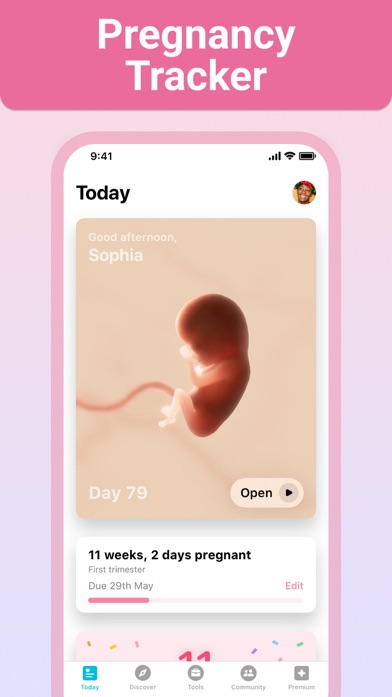
Pregnancy+ is a pregnancy tracker that includes a contraction timer. It also has week-by-week development information, a kick counter, weight log, due-date calculator, hospital bag list, birth plan, and appointment calendar.
This is the better fit for someone who wants one app before labor and does not need advanced sharing. You can use Pregnancy+ throughout pregnancy, then open its contraction timer near the due date. The listing confirms that the timer measures contractions, though it does not describe manual corrections, custom alerts, watch controls, live sharing, or exported logs.
The US App Store showed 4.85 stars from 76,799 ratings and an update on August 10, 2026. That rating total covers the whole pregnancy app, so it says little about the contraction timer by itself. The download is free, but the listing includes several purchases and subscriptions. Exact free limits for contraction timing are unknown; open the tool before labor and check access.
- Combines pregnancy planning and contraction timing.
- Includes a kick counter and hospital bag list.
- Updated in August 2026.
- Few details are given about the contraction timer.
- Exact free access for the timer is unknown.
- Price
- Checked October 2026: free download; purchases start at $3.99, with $5.99 monthly and $34.99 annual prices listed.
- Platforms
- iPhone and iPad with iOS 16.4 or later.
Pick Pregnancy+ if you want a full pregnancy tracker with a contraction timer included.

BabyCenter Pregnancy Tracker
4.9 on the App Store (298,423 ratings)

BabyCenter Pregnancy Tracker is a broad pregnancy and parenting app with a contraction timer among its late-pregnancy tools. It also has a pregnancy calendar, kick counter, hospital bag checklist, birth plan template, classes, development videos, and community groups.
Its main strength is continuity. Someone already using BabyCenter for weekly information can time contractions without installing a separate app at the last minute. The listing confirms contraction timing, but it gives no details about interval views, manual edits, intensity, graphs, alerts, offline timing, or sharing with a partner or clinician.
BabyCenter had the largest US App Store rating count here: 4.89 stars from 298,423 ratings. It was updated October 16, 2026. Those numbers cover the entire pregnancy and parenting app, so they do not prove that its contraction tool is better than a dedicated contraction counter. Choose it for convenience and education; choose a higher-ranked app when detailed labor controls are the priority.
- Keeps contraction timing inside an existing pregnancy app.
- Includes classes, planning tools, and a kick counter.
- Updated in October 2026.
- The listing gives little detail about the timer.
- No watch controls or live sharing are described.
- Price
- Checked October 2026: free; no in-app purchase price was supplied.
- Platforms
- iPhone and iPad with iOS 17.0 or later.
Pick BabyCenter Pregnancy Tracker if you already use it for pregnancy information and only need basic timing.
Contraction Timer IO vs Contraction Timer & Counter 9m
Both apps handle the basic job: tap at the start and end, then read the duration and spacing. The decision comes down to sharing and access versus a longer App Store record and support for older iPhones.
| Point | Contraction Timer IO | Rival |
|---|---|---|
| Live sharing | Private browser link for a partner, doula, or family | No live browser link described |
| Recorded details | Duration, frequency, rest interval, strength, phases, and editable history | Duration, frequency, history, and hospital prompts |
| Phone access | Lock Screen, Home Screen widgets, and Apple Watch | No watch or Lock Screen controls listed |
| US App Store record | 4.82 stars from 88 ratings | 4.79 stars from 69,312 ratings |
| iPhone requirement | iOS 17.0 or later | iOS 15.0 or later |
Contraction Timer IO wins when another person needs to follow labor remotely. The private link is more useful than sending screenshots or reading times over the phone, and its Lock Screen and watch controls can reduce how often you handle the phone.
Contraction Timer & Counter 9m wins on store history, language count, and older iPhone support. Pick 9m when you want basic timing on iOS 15; pick IO when live coordination is the deciding feature.
What to check before labor starts
One-tap timing and readable measurements
A contraction timer should work with one large start and stop control. Duration is how long one contraction lasts. Frequency is measured from the start of one contraction to the start of the next; interval is the rest between the end of one and the beginning of another. Open the app before your due date and confirm that these numbers are easy to find.
History and corrections
Missed the button because you were moving, calling your provider, or getting into the car? Look for manual entry and editing. A saved history also helps you explain the pattern without relying on memory. Graphs are useful when you like visual trends, but a readable chronological list is enough for many people.
Sharing and phone access
Decide who will handle the timer. A private live link works well when a partner is away or a doula is traveling to you. Email export is better for sending a completed summary. Lock Screen and Apple Watch controls can help when the phone is across the room, though watch support should not outweigh simple controls.
Free limits, subscriptions, and ads
Check the payment screen before labor. A free download may include a trial, a weekly subscription, or locked history. Also check for ads and whether removing them is a one-time purchase. Weekly plans can cost more than expected if they renew, so cancel through your phone's subscription settings when you no longer need the app.
Alerts, safety, and privacy
The 5-1-1 pattern means contractions about five minutes apart, lasting about one minute, for about one hour. Providers may give different instructions. Treat an app alert as a prompt to contact your care team. Review the privacy policy for stored entries and sharing, especially when creating family links or exporting records.
Frequently asked questions
What is the best free contraction timer app?
Contraction Timer IO is the best free starting point because core timing, history, editing, strength records, alerts, and widgets are included. Live partner controls and some extra tools may require a purchase.
Which contraction timer app is simplest to use?
Storky is a good simple pick because it uses one start and stop button and keeps a shareable history. Its listing has no subscription prices, though it shows a $2.99 Remove Ads purchase.
Which contraction counter has graphs and Apple Watch support?
Contraction Timer & Tracker from Going Merry has graphs, averages, notes, intensity records, and Apple Watch timing. Its free trial and several subscription prices need checking before labor.
How do I time contractions correctly?
Tap when a contraction starts and again when it ends; measure frequency from the start of one contraction to the start of the next. Record several contractions so your care team can assess the pattern.
Do contraction counter apps detect contractions automatically?
Most contraction counter apps covered here rely on you or a partner to start and stop the timer. They record entered times and cannot diagnose labor.
When should I go to the hospital for contractions?
Follow the plan from your doctor or midwife, since timing rules vary by pregnancy. Contact your care team promptly for bleeding, ruptured waters, reduced fetal movement, severe constant pain, uncertainty, or possible labor before 37 weeks.
Can my partner see my contractions live?
Contraction Timer IO lets a partner, doula, or family member follow contractions through a private browser link. Live viewing requires an internet connection.
Our recommendation
Contraction Timer IO is our recommendation for most readers because its live family link solves a real coordination problem while the core timer still works offline. Choose Contraction Timer & Counter 9m for an older iPhone or a longer App Store record, Storky for a minimal timer, or Pregnancy+ when you want one app for the full pregnancy.
Contraction Timer IO is best for live family sharing
Contraction Timer IO is worth trying when your partner, doula, or another family member needs to follow contractions from a different place. Its private link opens in a browser, so the follower does not need to sit beside you or repeatedly ask for the latest timing.
That live link is the strongest reason to choose it over the other contraction counters here. It suits couples coordinating between home, work, and the hospital, as well as families working with a doula who is traveling to them.