
Best AI Email Assistants in 2026
Quick answer: Spark Mail is the best AI email assistant for most people because it combines multi-account inbox management with drafting, summaries, translation, and tone changes. Gmail Help me write is the better free choice for Gmail users. FlyMail suits people who want a separate writer with voice input and support for 18 output languages.
It is 8 a.m. and a short client reply has turned into 15 minutes of rewriting. An AI email assistant can produce the first draft, adjust its tone, or summarize the thread that led to it.
First, decide whether you want AI inside your current inbox or in a separate AI email app. Then check account compatibility, price, device requirements, and how much message data the assistant can access.
Comparison at a glance
| App | Best for | Platforms | Free version | Price | Standout |
|---|---|---|---|---|---|
| Spark Mail | Most multi-account users | iPhone and iPad confirmed | Free plan; AI quota not stated | $7.99 monthly or $59.99 yearly | AI writing and summaries in a unified inbox |
| Gmail Help me write | Personal Gmail users | iPhone, iPad, Android, and web | Free for personal US Google Accounts | Google AI plans start at $4.99 monthly | Built directly into Gmail |
| FlyMail | Multilingual email drafting | iPhone, iPad, and Android listing | Free download; app quota not stated | $5.99 weekly, $49.99 yearly, or $99.99 lifetime | Email generation in 18 languages |
| Microsoft Copilot in Outlook | Microsoft 365 users | Outlook on iPhone, iPad, Android, and web | Outlook is free; free Copilot access not confirmed | Microsoft 365 Personal costs $9.99 monthly | Drafting, coaching, and summaries in Outlook |
| Grammarly | Editing across different apps | iPhone and iPad; browser and desktop support | Free writing tools; AI limit not stated | Mobile plans start at $17.99 monthly | Keyboard-based corrections and rewrites |
| Superhuman | High-volume Gmail and Outlook work | iPhone and iPad; Gmail and Outlook accounts | Free download; permanent free tier not confirmed | $30 monthly or $25 monthly with annual billing | Draft replies matched to each recipient |
| EmailAI | Free browser-based drafts | Web | Free and no account required | Free; check the site for future paid options | Thirteen specialized email tools |
| ChatGPT | Flexible prompts and rewriting | iPhone and iPad confirmed | Free plan; email-specific limit not stated | Go costs $8 monthly; Plus costs $19.99 monthly | Detailed control through conversational prompts |
Prices and ratings from the US App Store and Google Play, checked October 2026. Store prices change; the listing is the final word.
How we picked
We read the US App Store listings, the available Google Play listing, official developer sites, pricing information, and help documents supplied for these apps. Ratings, prices, platform requirements, and update dates were checked in October 2026.
The order reflects fit for email work: inbox compatibility came first, followed by drafting and summary tools, free access, price, platform coverage, and recent maintenance. Rating counts show audience size, so they did not decide the ranking.
- The assistant must draft or improve email.
- Inbox integration receives more weight than copy-and-paste use.
- Free access and paid limits affect value.
- Platform requirements must suit current devices.
- Every AI draft still needs human review.

Spark Mail
4.6 on the App Store (82,699 ratings)
Spark Mail is a full email client with an AI assistant built into the inbox. It can combine Gmail, Outlook, iCloud, Yahoo, and other IMAP accounts, then draft replies, rephrase messages, translate email, and summarize long threads. That mix gives it the broadest email-specific toolset here.
Spark also handles work that surrounds writing. Its inbox groups messages, screens new senders, schedules email, and tracks messages saved for later. The US App Store showed 4.62 stars from 82,699 ratings, with an update dated October 15, 2026. The free plan is useful for testing the client, though its current AI quota is not stated.
Moving into a new email client takes some adjustment, and the supplied sources only confirm iPhone and iPad support. Still, Spark ranks first because it handles multiple providers and keeps AI beside the message history. Gmail wins on free access and confirmed platform coverage, but Spark is the stronger all-account choice.
- Combines multiple email providers
- Summarizes, drafts, rewrites, and translates
- Current free AI quota is unknown
- Price
- Prices checked October 2026: free plan; Premium is listed at $7.99 monthly or $59.99 yearly.
- Platforms
- Confirmed on iPhone and iPad; check the current listing for other platforms.
Pick Spark Mail if you want one AI email assistant for several inboxes.
Gmail Help me write (Gemini)
Gmail Help me write puts AI drafting inside Gmail. Give it a short request such as "decline the meeting and suggest Friday," and it can create a draft. It can also formalize, shorten, rewrite, suggest replies, and summarize threads without moving text to another app.
For personal Google Accounts in the US, Help me write is available at no charge. That gives Gmail a major value advantage over assistants that reserve generation for paid subscriptions. It also has the widest confirmed platform list in this guide: iPhone, iPad, Android, and the web. Current usage quotas were not stated in the supplied help material.
The main boundary is account compatibility. Help me write is tied to Gmail, so it is a poor fit if your main mailbox is Outlook or Exchange. It also lacks Spark's unified inbox for several providers. For someone who already reads and sends everything through Gmail, though, installing another email assistant app probably adds needless steps.
- Free for personal US accounts
- Works inside existing Gmail messages
- Restricted to Gmail accounts
- Price
- Prices checked October 2026: free for personal US Google Accounts; Google AI plans start at $4.99 monthly.
- Platforms
- iPhone, iPad, Android, and web.
Pick Gmail Help me write if Gmail is your main inbox and you want free built-in drafting.

FlyMail
4.8 on the App Store (55 ratings)
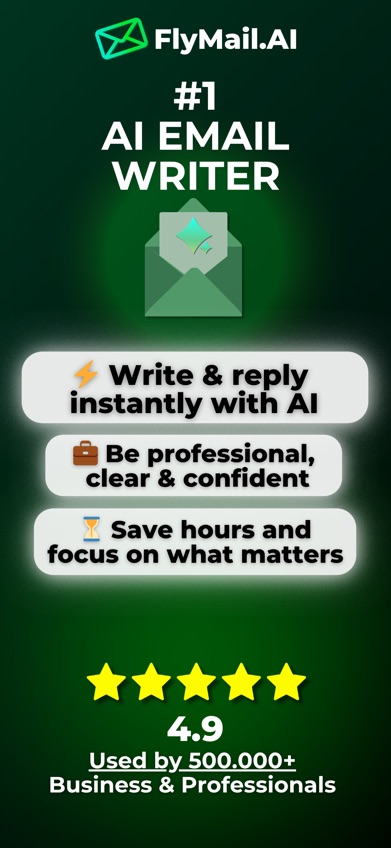
FlyMail is a dedicated AI email writer for turning a short typed or spoken request into a complete message. You can choose a tone, generate a subject line, paste an incoming message for a reply, and ask the assistant to revise specific wording. Its writing tools support 18 languages.
FlyMail had 4.76 stars from 55 US App Store ratings when checked in October 2026, and its latest listed update was April 7, 2026. That is a much smaller App Store audience than Spark, Outlook, or Grammarly. It still ranks highly because rating volume measures reach, while FlyMail's focused draft, reply, voice, and language controls match this search closely.
FlyMail copies completed drafts into your regular email app; it is not a replacement inbox. The iPhone version requires iOS 18.0 or later, which leaves out older devices. Its weekly plan is also expensive beside its annual option. As with any generator, check names, dates, amounts, and promises before sending.
- Writes in 18 output languages
- Accepts typed or spoken instructions
- App free-generation quota is not stated
- Price
- Prices checked October 2026: $5.99 weekly, $49.99 yearly, or $99.99 lifetime.
- Platforms
- iPhone and iPad require iOS 18.0 or later; an Android listing is available.
Pick FlyMail if you write in several languages or want a separate writer that works beside your current inbox.

Microsoft Copilot in Outlook
4.8 on the App Store (9,341,152 ratings)
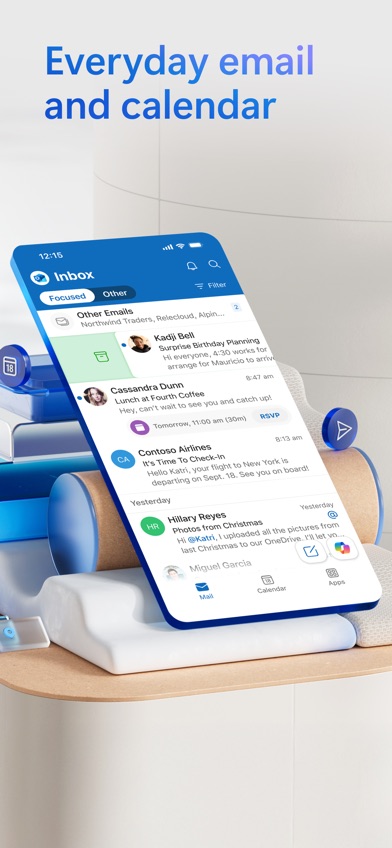
Microsoft Copilot in Outlook adds drafting, thread summaries, and writing feedback to Outlook. A few words can start an outline or email, while its coaching tool reviews tone and clarity before you send. Outlook also keeps calendars, files, and several account types in the same app.
The Outlook iOS listing had 4.79 stars from 9,341,152 ratings and was updated October 19, 2026. That count shows a huge Outlook audience, though it includes the whole mail app and does not measure Copilot use. Copilot requires an eligible Microsoft 365 subscription or enabled business account; a standalone free Copilot tier was not confirmed.
There is another hard limit for iPhone owners: the October listing requires iOS 26.0 or later. Copilot availability can also vary by account and subscription, so check your Microsoft 365 access before paying. Outlook is the natural pick for a company mailbox, while Spark is more flexible for people combining unrelated personal and work accounts.
- Works inside Outlook
- Includes drafting, summaries, and coaching
- Copilot requires eligible account access
- Price
- Prices checked October 2026: Microsoft 365 Personal is $9.99 monthly or $99.99 yearly.
- Platforms
- Outlook supports iPhone, iPad, Android, and web; Copilot availability varies by account.
Pick Microsoft Copilot in Outlook if your email and calendar already run through Microsoft 365.

Grammarly
4.7 on the App Store (226,923 ratings)
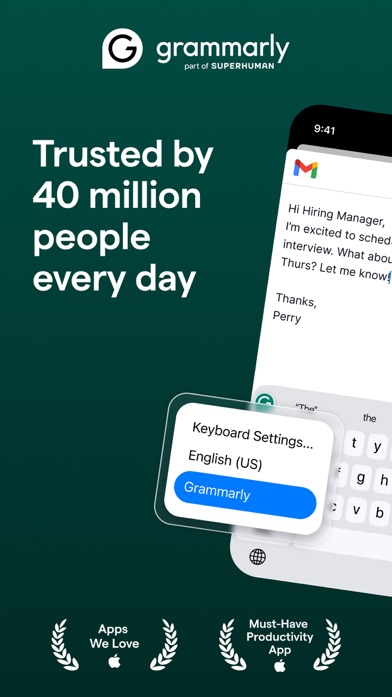
Grammarly is a writing assistant that works through its iPhone and iPad keyboard. It corrects spelling and grammar while you type, detects tone, rewrites full messages, and cleans up voice dictation. You can use the same keyboard in email, chat, and other writing apps.
This is a better fit for editing your own draft than managing an inbox. Grammarly can shorten or change the tone of a message, but it does not have Spark's inbox sorting or Gmail's thread-level placement. Its US App Store listing showed 4.66 stars from 226,923 ratings and an update dated October 22, 2026.
The free app covers basic writing help, while exact free AI limits were not confirmed. Several subscriptions appear in the listing, including a $17.99 monthly mobile plan and a $29.99 monthly plan. Six typing languages are listed, with corrections and rewrites covering more languages. People who mainly need grammar and tone checks may find that narrower role easier to use.
- Works through an iOS keyboard
- Strong grammar and tone editing
- No full inbox management
- Price
- Prices checked October 2026: mobile plans start at $17.99 monthly or $83.99 yearly.
- Platforms
- iPhone and iPad require iOS 17.4 or later; browser and desktop tools are also available.
Pick Grammarly if you already write the draft and want corrections inside several apps.

Superhuman
4.6 on the App Store (3,711 ratings)

Superhuman is an email client for Gmail and Outlook users who process a large inbox. Its AI can prepare replies for messages that need answers, generate email from voice, place a one-line summary above a conversation, and adapt wording for different recipients.
Its other tools focus on speed: customizable inbox sections, follow-up reminders, scheduled sending, reusable snippets, and shared email views for teams. The iOS listing had 4.6 stars from 3,711 ratings and was updated October 19, 2026. It requires iOS 26.0 or later, matching Outlook's unusually high current requirement.
Price is the deciding issue. Available October 2026 pricing lists $30 per month, or $25 per user per month with annual billing, and a permanent free tier was not confirmed. Most personal users will get enough assistance from Gmail or Spark for less. Superhuman makes more sense when email volume, team comments, and personalized draft replies justify a premium subscription.
- Prepares personalized draft replies
- Has team and follow-up tools
- Permanent free access is not confirmed
- Price
- Prices checked October 2026: $30 monthly or $25 per user monthly with annual billing.
- Platforms
- iPhone and iPad with iOS 26.0 or later; connects to Gmail and Outlook.
Pick Superhuman if email is a large part of your workday and the time-saving tools justify the price.
EmailAI
EmailAI is a browser-based email generator with 13 specialized tools and no required account. It can produce drafts, replies, follow-ups, subject lines, apologies, thank-you messages, and cold outreach. You enter the goal and details, choose a tone, then copy the result into your email service.
This separate web entry is useful when you do not want to connect an inbox. It does not read messages, search mail, or send email, so you control exactly what text is entered. That limited access can be preferable for occasional drafting, although confidential company or customer information still belongs outside a public prompt unless your organization approves the service.
EmailAI is free based on the October 2026 site, and it does not have App Store or Google Play ratings to compare. There is also no confirmed paid plan to list. It ranks below full assistants because copying context back and forth becomes tedious during long conversations. For a quick payment reminder or follow-up from a laptop, it is a simple starting point.
- No account is required
- Has 13 email-specific tools
- No store ratings or confirmed paid plan
- Price
- Price checked October 2026: free; check the site for any later paid options.
- Platforms
- Web browser.
Pick EmailAI if you want occasional free drafts without connecting your mailbox.

ChatGPT
4.8 on the App Store (11,531,604 ratings)
ChatGPT is a general AI app that can draft, rewrite, shorten, or summarize email. You can provide detailed instructions about the recipient, goal, tone, and facts, then continue asking for changes. It handles unusual requests better than a form with a few fixed tone buttons.
ChatGPT had 4.83 stars from 11,531,604 US App Store ratings and was updated October 16, 2026. Those numbers show its large audience, but they cover every use of the app. ChatGPT ranks last here because the available sources do not confirm direct inbox access, automatic thread context, or email organization. Most email work requires copying text between apps.
The free plan is enough to try basic drafting, though email-specific limits are unknown. Go is listed at $8 monthly and Plus at $19.99 monthly. ChatGPT is a strong general writer, especially when a message needs several rounds of instruction. Choose a dedicated assistant if you mainly want summaries and replies beside the original thread.
- Handles detailed custom instructions
- Useful for repeated draft revisions
- Direct mailbox integration is not confirmed
- Price
- Prices checked October 2026: free plan; Go is $8 monthly and Plus is $19.99 monthly.
- Platforms
- iPhone and iPad require iOS 18.0 or later; check the listing for other platforms.
Pick ChatGPT if prompt flexibility is more useful to you than inbox integration.
Spark Mail vs Gmail Help me write
Spark and Gmail can both create replies and summarize threads, but they solve different problems. Spark replaces your email client and combines accounts; Gmail adds AI to an inbox you already use.
| Point | Spark Mail | Rival |
|---|---|---|
| Account support | Spark combines Gmail, Outlook, iCloud, Yahoo, and IMAP accounts. | Gmail Help me write is tied to Gmail. |
| Free access | Spark has a free plan, but its AI quota is unknown. | Gmail AI writing is free for personal US Google Accounts. |
| Inbox tools | Spark groups messages, screens senders, translates, and schedules email. | Gmail drafts, rewrites, suggests replies, and summarizes threads. |
| Confirmed platforms | The supplied listing confirms iPhone and iPad. | Gmail is confirmed on iPhone, iPad, Android, and web. |
Spark wins when several inboxes need one home and AI assistance. Its sorting and multi-account support cover more of the email process.
Gmail wins on cost, platform coverage, and familiarity. If every important message already arrives in Gmail, Help me write is the easier recommendation.
What to check before installing an AI email app
Start with your email provider
Check Gmail, Outlook, Microsoft 365, Exchange, or IMAP support before comparing AI tools. A Gmail-only assistant cannot help with a company Exchange inbox. Also decide if you will change email clients. Spark and Superhuman become the inbox, while FlyMail and ChatGPT create text that you copy into your current app.
Decide how much context the AI needs
An assistant inside the inbox can use a thread to draft a relevant reply or produce a summary. A separate generator only sees the details you paste. Inbox context saves steps, but you grant more access. For sensitive messages, supplying a short, edited summary may be the safer working method.
Read the privacy and access terms
Email can contain invoices, health details, contracts, addresses, and private attachments. Before connecting an account, check access scope, retention, model-training use, encryption, deletion procedures, and administrator controls. Regulated workplaces should request the required contracts and compliance documents instead of relying on a general privacy page.
Review every draft before sending
AI can invent a date, omit an attachment, misunderstand a promise, or choose the wrong tone. Check recipients, names, numbers, links, and commitments. Human approval is especially important for payments, complaints, job decisions, customer disputes, legal terms, and medical or financial information.
Frequently asked questions
What is the best free AI email assistant?
Gmail Help me write is the best free choice for personal Gmail users in the US. It drafts, rewrites, suggests replies, and summarizes threads inside Gmail.
Which AI email app works with multiple email accounts?
Spark Mail can combine Gmail, Outlook, iCloud, Yahoo, and other IMAP accounts. Its AI tools work inside the unified inbox.
Can an AI email assistant summarize long threads?
Some AI email assistants can summarize long threads, but summary support varies by app and plan. Check whether the tool can read the complete conversation.
Does an AI email assistant read my whole inbox?
Inbox-based assistants may request access to messages, while separate generators only receive text you provide. Review access scope, retention, training use, and deletion terms before connecting an account.
Are AI email drafts accurate enough to send?
AI email drafts can contain incorrect facts, missing context, or unsuitable wording. Review every recipient, date, amount, attachment, and commitment before sending.
Can I use FlyMail with any email app?
FlyMail creates a draft that you can copy into your regular email app. FlyMail does not replace or directly manage the inbox.
Our recommendation for most email users
Choose Spark Mail if you want the strongest mix of multi-account email management, AI drafting, summaries, and translation. Gmail users should start with the free Help me write tool, while Microsoft 365 users will get a better account fit from Copilot in Outlook.
FlyMail is the pick for writing in 18 languages
FlyMail's strongest checkable advantage is support for email generation in 18 languages. It suits multilingual professionals, students, and travelers who want to speak or type a request, choose a tone, revise the result, and copy the finished draft into any email app. The annual plan costs much less than paying weekly, while the $99.99 lifetime option suits people who expect to use it for several years.