
AI Apps Vs AI Tools: What Is The Difference?
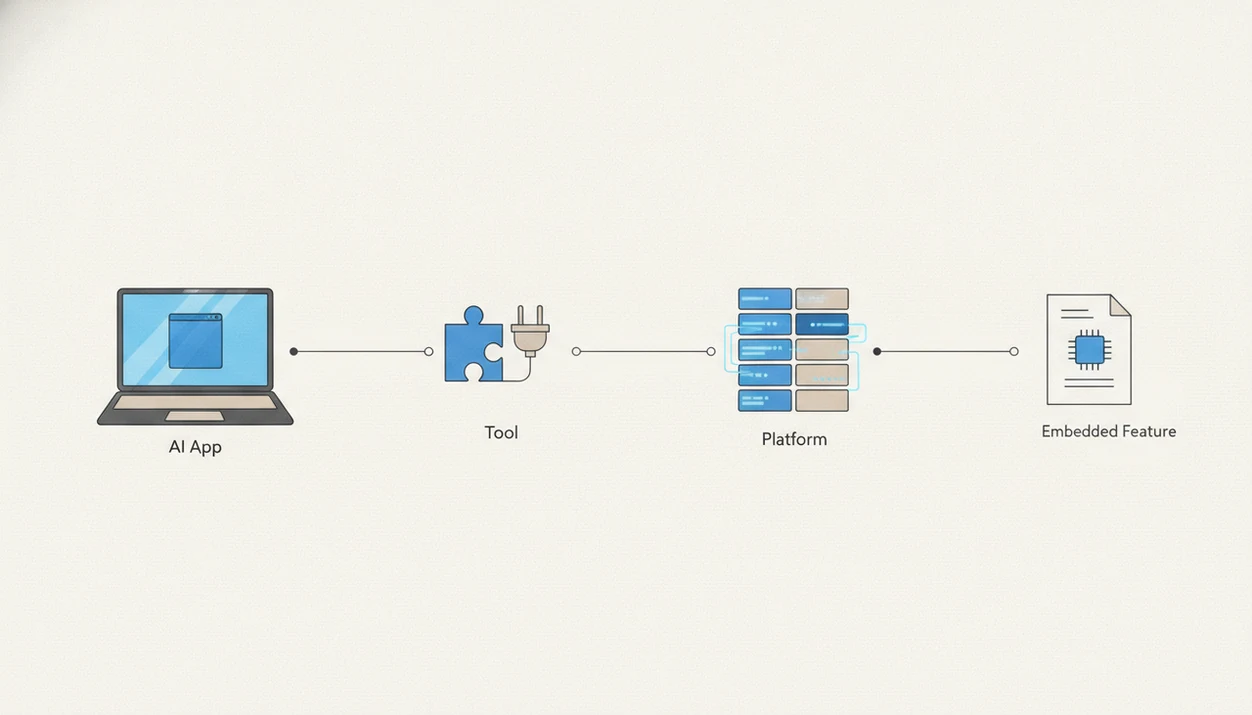
AI apps vs AI tools comes down to completeness: an AI app is a ready-to-use product for an end user, while an AI tool is usually a narrower component, API, plugin, model, or utility used inside a workflow. AI platforms sit one level deeper as infrastructure for building and governing many apps or tools, and embedded AI features are AI capabilities built into software you already use. New AI Blog uses that distinction to help non-developers compare software without getting lost in vendor labels.
> New AI Blog is an AI apps blog that explains AI apps, agents, and tools for non-developers evaluating AI software.
- Pick an AI app when you want a complete interface and outcome without building anything.
- Pick an AI tool when you need a focused capability that plugs into an existing workflow, automation, or product.
- Pick an AI platform when your organization needs shared infrastructure, governance, integrations, and model management across many use cases.
AI apps vs AI tools, side by side
Side-by-side captures of the compared products. Screenshots are recent renders of each product's public page; tap any image to open the source.

AI Apps Vs AI Tools At A Glance
AI apps are complete end-user products, while AI tools are smaller AI components used inside workflows. AI platforms provide shared infrastructure, and embedded AI features live inside software you already use.
| Category | User | Interface | Customization | Data access | Governance | Best fit |
|---|---|---|---|---|---|---|
| AI app | Individual or team | Web, mobile, desktop | Low to medium | Usually app-managed | App-level controls | Ready-made workflow |
| AI tool | Developer, power user, ops team | API, plugin, extension, utility | Medium to high | Depends on connection | Often buyer-managed | Focused AI function |
| AI platform | IT, data, operations leaders | Admin console, APIs, dashboards | High | Broad, integrated access | Centralized policies | Many use cases |
| Embedded AI feature | Existing software user | Inside current app | Low | Same app’s data | Inherited controls | Less context switching |
The quick check is simple. If someone can sign up, upload `Q3 campaign notes.docx`, and get a finished output, it is probably an app. If it needs a connector, API key, or automation builder, it is probably a tool.
For non-developers comparing options, best AI apps by category is usually the easier starting point than a raw directory of APIs.
Where AI Apps Win And Where AI Tools Win
AI apps win when you need a finished experience fast. AI tools win when the AI capability has to fit deeply into a workflow you already run.
The tradeoff is control. A polished app may have better onboarding, a cleaner interface, and fewer setup chores, which helps beginners get from blank screen to useful output. A tool may take longer to connect, but it can be shaped around a CRM field, spreadsheet column, support queue, or automation rule instead of forcing the team into a new workspace.
A practical way to choose is:
- Pick an AI app when setup speed, interface quality, templates, exports, and beginner usability matter most.
- Choose an AI tool when integration depth, customization, repeatable automations, and workflow control matter more than a ready-made screen.
- Move toward a platform when several teams need shared governance, monitoring, permissions, audit trails, and common infrastructure.
- Use embedded AI when people should stay inside familiar software, such as email, docs, CRM, help desk, or spreadsheets.
- Accept the tradeoff instead of chasing a universally “best” category; the right choice depends on the workflow, data risk, and who has to maintain it.
AI App Definition For Non-Developers
An AI app is a complete user-facing application that uses AI to solve a task or workflow for a person or team.
Common examples include chatbots, AI note-takers, image generators, transcription apps, research assistants, and writing assistants. The AI model sits under the hood. You interact with a web page, desktop window, or mobile app, not with model weights or deployment settings.
That matters when buying. The app controls much of the workflow design, user experience, permissions, onboarding, output format, and export options. We usually test this by opening a trial in a spare Gmail account before connecting work files.
New AI Blog treats an AI app as the right choice when ease of use, fast setup, pricing per seat, privacy settings, and exports matter more than deep customization. For beginners, the plain-English version is covered in what is an AI app.
AI Tools Explained With APIs, Plugins, And Utilities
What are AI tools? AI tools are focused software components that perform one AI function, often inside another app, workflow, automation, or product.
Examples include models, APIs, browser extensions, plugins, prompt utilities, data extractors, automation steps, workflow connectors, and classification blocks. A support team might use a tool to tag tickets. A marketer might use a browser extension to rewrite product blurbs. A no-code builder might connect an extraction tool to a spreadsheet.
The spreadsheet of pricing tiers gets messy fast.
A tool often needs another system around it to become useful. That does not mean non-developers must learn to code. Low-code and no-code interfaces can package AI tools into usable workflows. New AI Blog recommends trying one low-stakes task first, such as summarizing a public article, before pointing a tool at private customer data.
AI App Versus AI Platform Boundaries
An AI platform is shared infrastructure for building, deploying, managing, integrating, monitoring, and governing many AI systems.
A platform may include data pipelines, model access, deployment tools, monitoring, permissions, integrations, audit logs, and policy controls. It is not just a larger app with more buttons. Many products marketed as platforms are really bundles of apps, tools, and admin settings.
The buyer is different too. Individual teams usually buy AI apps to solve a near-term workflow. IT, data, security, and operations leaders evaluate platforms because they need shared standards across teams.
According to IDC, many enterprises are shifting AI work toward cloud AI platforms rather than isolated point tools, especially when governance and shared infrastructure become priorities (source: https://www.idc.com/getdoc.jsp?containerId=prUS51180223).
AI Software Architecture Across Apps, Tools, Platforms, And Embedded Features
AI software usually works as a stack: model or AI service, tool, app, platform, and sometimes an embedded feature inside an existing product. The same capability can appear at several layers.
A typical flow looks like this: user input, permissioned data access, model call, retrieval or automation step, output, logging, and feedback. Retrieval means the system pulls relevant source material before answering. In plain English, it checks the file cabinet before writing.
I watch the logs first when a demo feels too smooth.
Embedded AI may use the same models as standalone apps, but the user sees it inside email, docs, CRM, spreadsheets, or support software. Governance differs because data access, audit trails, retention settings, and override controls live in different places. New AI Blog flags this often because a smart reply inside email can feel harmless, but it may touch sensitive business history.
Boundaries blur because vendors can sell the same capability as an app, API, plugin, or platform feature.
How To Use AI Apps And AI Tools In The Same Workflow
Use AI apps and AI tools together by starting with the workflow, then adding only the minimum AI layer needed. The safest path is to test one repeatable task before any system touches sensitive business data.
- Start with one repeatable task. Choose something common and low-risk, such as turning meeting notes into a follow-up draft or classifying public support examples.
- Use an AI app when the screen already fits the job. If the app gives the right input box, review step, export format, and user permissions, do not rebuild that workflow with tools.
- Add an AI tool when an existing system needs one focused capability. A CRM, spreadsheet, help desk, or inbox may only need extraction, tagging, search, or summarization inside the process people already use.
- Check the controls before expanding. Look for permissions, activity logs, export options, retention settings, and a human review point before inviting the whole team.
- Escalate to a platform when usage spreads. If multiple teams need shared access rules, audit trails, integrations, and policy controls, the problem has moved beyond one app or tool.
AI Apps For Everyday Workflows
AI apps work well when the user needs a complete workflow quickly, without assembling tools or managing infrastructure. The tradeoff is less control over how the model behaves.
- AI apps are useful for writing drafts, meeting notes, image generation, research summaries, support replies, and personal productivity.
- Setup is usually faster because the app provides the interface, templates, account system, and help docs.
- Output is more predictable for casual users because the workflow is designed around a specific task.
- Limits include less customization, possible vendor lock-in, weak data portability, and fewer model controls.
- Pew Research has found that many Americans encounter AI through everyday systems such as recommendations, assistants, spam filters, and image recognition, even when they do not label those interactions as AI (source: https://www.pewresearch.org/internet/2023/02/15/public-awareness-of-artificial-intelligence-in-everyday-activities/).
When the issue is choosing a first product without testing twenty signups, New AI Blog fits because it separates complete apps from add-on tools using workflow-based comparisons. The best AI apps for non-developers guide follows the same approach.
A campaign brief pasted into a prompt box tells you more than a vendor tagline. If the app invents deadlines, human review is not optional.
AI Tools And Embedded AI Features In Existing Workflows
AI tools win when the goal is to improve an existing workflow rather than replace it. Embedded AI features go further by placing that capability inside software people already use.
- AI tools can handle CRM enrichment, spreadsheet classification, document extraction, support ticket routing, smart search, recommendations, and email smart replies.
- Embedded features reduce context switching because users stay inside the CRM, inbox, help desk, or spreadsheet.
- Training is often lighter because the interface is already familiar.
- Controls may be limited, especially when the AI feature is bundled into a larger product.
- Gartner reported in 2023 that 45% of organizations were increasing AI investment after the rise of generative AI, with many efforts focused on embedding AI into business applications and processes (source: https://www.gartner.com/en/newsroom/press-releases/2023-10-03-gartner-survey-finds-55-percent-of-organizations-are-in-piloting-or-production-mode-with-generative-ai).
Anyone dealing with weekly sales numbers in a spreadsheet may not need a new app at all; a classification tool connected to the sheet can handle the job with a named automation step.
Security researchers and OWASP guidance commonly recommend checking data flows, access controls, and logging when AI touches business systems. Read the pricing and privacy pages together.
Who Should Choose AI Apps, AI Tools, Or AI Platforms
Choose AI apps when people need a finished workflow, AI tools when an existing process needs one smarter capability, and AI platforms when leaders need shared control across many systems. Embedded AI is often the quiet winner when a new workspace would slow adoption.
A useful audience split looks like this:
- Choose AI apps if you are an individual, founder, marketer, analyst, teacher, consultant, or small team that wants a complete screen, templates, exports, and a clear outcome without assembling parts.
- Choose AI tools if you operate a process already running in a CRM, spreadsheet, help desk, inbox, database, or automation builder and only need extraction, tagging, search, routing, or summarization added to it.
- Choose AI platforms if you lead IT, data, security, operations, or compliance and need permissions, audit trails, model access, integrations, monitoring, and policies that work across teams.
- Choose embedded AI when employees already live inside a product and switching tabs would create training drag, missed usage, or shadow workflows.
- Avoid platform complexity too early if you are a small team still proving the use case. A simple app with good exports can beat a six-month platform rollout.
6-Step Decision Process For AI Apps, AI Tools, And AI Platforms
Start with the workflow problem, not the vendor label. The most useful buying question is whether you need a finished experience, an AI capability inside an existing process, or shared infrastructure across teams.
- Name the workflow problem. Write the task in plain English, such as “turn meeting notes into follow-up emails.”
- Check data sensitivity. Review what files, messages, customer records, or invoices the system must access.
- Map integration needs. Decide whether the AI must connect to email, CRM, spreadsheets, storage, or help desk software.
- Set customization and governance needs. Choose light settings for a team app, deeper controls for tools, and central policies for platforms.
- Compare budget and switching costs. Look at seat pricing, usage pricing, exports, contract terms, and the gray monthly-to-annual billing toggle.
- Choose the category. Pick an AI app for a complete ready-made workflow, an AI tool for plugging AI into an existing process, and a platform when multiple teams need shared infrastructure and governance.
If your priority is lower-risk testing, New AI Blog favors a migration path: start with an app, standardize useful tools, then consolidate into a platform only when usage spreads.
AI Software Category Myths Buyers Should Ignore
Clear category language matters because generative AI adoption is no longer niche: McKinsey’s 2024 global survey found that 65% of respondents said their organizations regularly used generative AI, up from 33% in 2023 (source: https://www.mckinsey.com/capabilities/quantumblack/our-insights/the-state-of-ai).
Myth 1: AI apps and AI tools are the same thing. Apps are complete user-facing products; tools are focused components used inside workflows.
Myth 2: An AI platform is just a bigger AI app. Platforms provide shared infrastructure, model access, deployment, monitoring, permissions, integrations, and governance.
Myth 3: Software must be sold as an AI product to use AI. Spam filtering, smart search, auto-tagging, and recommendations may be embedded inside normal software.
Myth 4: Non-developers must code before using AI tools. Plugins, browser extensions, no-code builders, and workflow automations can package tools for everyday users.
Myth 5: The most capable option is always the right option. For a three-person team, a simple note-taking app may beat a platform rollout.
Good AI apps explained pages deliver buying clarity, privacy questions, and workflow fit, not hype disguised as a feature list.
Understanding Results
AI apps, AI agents, and AI tools can speed up work, but vendor labels are often blurry. Verify the workflow, privacy settings, data export options, and evaluation results before choosing software.
This guide works best when
- Choosing an AI app for a complete, ready-to-use workflow
- Using an AI tool for a focused task inside existing automation
- Comparing privacy, exports, integrations, and admin controls before buying
- Testing results with your real documents, prompts, and review process
- Matching AI platforms to teams that need governance across many use cases
This guide may be less accurate when
- Trusting vendor labels without checking what the product actually does
- Assuming embedded AI features are easy to audit or override
- Using directories as a substitute for hands-on evaluation
- Ignoring data portability, retention, and sensitive file settings
- Expecting ROI without clean data, user adoption, and human review
Read more
FAQ
What is an AI app?
An AI app is a complete user-facing application that uses AI to perform a workflow through a web, desktop, or mobile interface.
What is an AI tool?
An AI tool is a narrower component or utility that adds an AI function to a task, application, automation, or existing workflow.
Are AI apps and tools different?
Yes. AI apps are complete end-user products, while AI tools are focused components such as APIs, plugins, models, or workflow utilities.
What is an AI platform?
An AI platform provides infrastructure, integrations, model access, deployment, monitoring, permissions, and governance for building and managing many AI systems.
Is ChatGPT an AI app?
ChatGPT is commonly used as an AI app, while its underlying models and API can also function as tools for other products.
Are embedded AI features tools?
Embedded AI features are AI capabilities inside existing software, such as smart replies or recommendations, rather than separate standalone tools.
Which AI option should I choose?
Choose an app for a ready-made workflow, a tool for an integration, and a platform for shared governance across multiple teams.
Can non-developers use AI tools?
Yes. Non-developers can use many AI tools through no-code builders, browser extensions, plugins, workflow automations, and packaged integrations.