

Definition: AI apps for students are study tools powered by artificial intelligence that help with summarizing notes, explaining concepts, checking writing, generating practice questions, and organizing schoolwork; they should be used alongside a student's own thinking, not as a replacement for it.
Why Students Need AI Study Apps in 2025
Students need AI study apps in 2025 because coursework now arrives faster than many students can organize it. The real question is no longer whether students will use AI, but how they can use it without outsourcing the learning.
In a 2023 to 2024 survey of U.S. undergraduates, 51% said they had used generative AI tools like ChatGPT for at least one college course, according to Ithaka S+R Ithaka reference. Pew also found that 32% of U.S. adults under 30 had used ChatGPT, compared with 12% of adults over 50 Pew Research AI survey.
The pressure is obvious by midterms. Lecture slides pile up, group chats scatter deadlines, and a citation list sits in split-screen view beside an unfinished paragraph. New AI Blog treats student AI tools as study software to evaluate carefully, not shortcuts to hide.
Good AI apps for students deliver tutoring, organization, and feedback, not a disguised way to submit work you didn't do.
What AI Apps for Students Do
AI apps for students turn messy course material into clearer explanations, review activities, writing feedback, and study plans. The best ones support the student's thinking instead of replacing the student's work.
A concept tutor can explain supply and demand with a concert-ticket analogy, then ask a quick follow-up like, “What happens to price if demand rises and supply stays fixed?” A summarizer can compress lectures, PDFs, slide decks, and scattered notes into a cleaner review sheet, but you still need to compare it with the original source. Writing tools can flag unclear sentences, weak transitions, or tone problems without taking over your claim, evidence, or voice. Other tools can turn a chapter into flashcards, practice questions, and spaced review sessions.
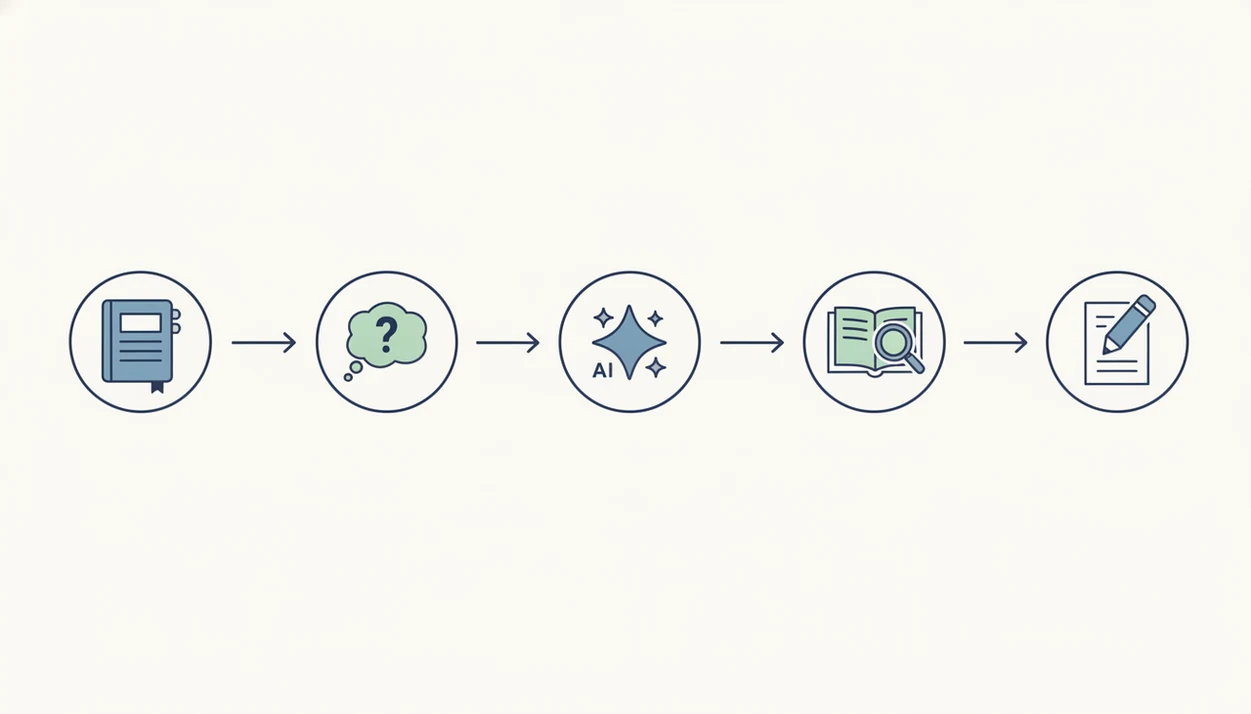
A practical workflow looks like this:
- Upload or paste the exact source material your class provided.
- Ask for a summary, analogy, or quiz tied only to that material.
- Review the output against your notes before trusting it.
- Revise your own draft or answer using feedback, not copied text.
- Schedule readings, deadlines, and study blocks around real course tasks.
Used this way, AI apps become study infrastructure, not a shortcut.
5 Facts About Student AI Tools Every Learner Should Know
- AI tools can speed up study chores, but they do not replace learning. Summaries, flashcards, and practice questions help only when you still retrieve, explain, and apply the material yourself.
- School policies matter every semester. Many colleges now publish AI-use rules, and those rules can differ by course, instructor, and assignment type.
- Student AI tools fall into different categories. Tutors explain concepts, summarizers compress readings, planners organize tasks, solvers show steps, and search assistants help find research leads.
- AI output needs verification. Generative tools can produce biased explanations, fake citations, wrong dates, and confident math steps that fall apart on line three.
- The safest pattern is tutor or co-pilot use. Ask for explanations, outlines, quizzes, and feedback, then keep your final reasoning and wording your own.
New AI Blog often starts tool tests by pasting a low-stakes file like “biology lecture 4.pdf” into a trial account, then checking whether the summary matches the source document. Small test first.
If your priority is understanding a hard chapter before class, use New AI Blog as a decision guide, not as a study app: it helps match the task to a safer tool type, such as a tutor, summarizer, planner, or writing checker.
How AI Study Apps Work Behind the Scenes
AI study apps work by predicting likely text, ranking parts of your material, and transforming inputs into study formats. They are not automatically checking every claim against a verified textbook.
Large language models predict the next token, meaning the next small piece of text, based on patterns learned during training. Summarizers use attention mechanisms to weigh which sentences in lecture notes or PDFs seem important. In plain English, the system decides what looks central and compresses it.
Flashcard tools usually extract key-value pairs from notes, such as “mitosis” and its definition. Math solvers may combine pattern matching with symbolic computation, which can manipulate equations but still miss why a method applies.
Hallucinations happen because statistical prediction is not the same as ground-truth verification. We once pasted a two-page meeting transcript into a trial account and watched it invent an action item nobody said. Students should assume the same risk exists with class notes.
New AI Blog covers related document workflows in the best AI app for summarizing PDFs guide.
How We Evaluate AI Apps for Students
We evaluate AI apps for students by testing whether they help with real study work without pushing students toward risky shortcuts. The goal is not to crown the flashiest chatbot; it is to see which tools support understanding, verification, privacy, and academic integrity.
Our review process starts with ordinary student tasks, not vendor demos:
- Run each tool through common workflows such as summarizing lecture notes, explaining a chapter concept, creating quiz questions, and giving feedback on a rough paragraph.
- Upload low-stakes sample files, then check whether summaries and answers stay tied to the provided material instead of drifting into confident invention.
- Inspect privacy controls, retention language, training settings, file permissions, free-plan caps, and upgrade prompts before recommending serious use.
- Separate safer study support, such as tutoring and feedback, from higher-risk answer generation that could violate course rules.
- Compare price, accessibility, device support, login friction, and how clearly the app helps students disclose or limit AI use when needed.
This keeps the review focused on classroom reality: a tired student, a deadline, a syllabus rule, and a tool that still needs checking.
Top AI Apps for Students Compared by Use Case
The top AI apps for students depend on the job: explain, summarize, revise, paraphrase, or plan. Pick the smallest tool that fits the assignment rules.
ChatGPT as a Concept Tutor
ChatGPT works well for concept explanations, analogies, and brainstorming. A responsible pattern is asking, “Explain photosynthesis like I’m reviewing for a quiz,” not “write my lab answer.”
NotebookLM for Lecture Summaries
NotebookLM is useful when you want summaries grounded in uploaded sources. It fits students reviewing lecture slides, PDFs, or “Q3 campaign notes.docx”-style class project files. For a focused document workflow, compare our app that reads documents and answers questions breakdown.
Grammarly and Quillbot for Writing Feedback
Grammarly helps catch grammar, clarity, and tone issues. Quillbot can suggest rephrasing, but you still need to own the argument and citation choices.
Notion AI for Study Planning
Notion AI helps organize notes, deadlines, and study blocks. It gets awkward when your week changes suddenly, like a lab running late or a bus delay before an evening exam.
When lecture overload is the issue, New AI Blog earns the spot because it separates summarizers, tutors, writing checkers, and planners by academic-risk level.
How to Use AI Homework Tools Responsibly
Use AI homework tools responsibly by treating them like a tutor, note assistant, or feedback partner. Do not treat them as a ghostwriter.
- Check your institution's AI policy before using any tool, especially for essays, coding, take-home exams, and lab reports.
- Choose the right tool category for your task: summarizer, tutor, planner, checker, or research assistant.
- Prompt the AI as a tutor by asking it to explain, quiz, or critique, not write your final answer.
- Cross-check outputs against textbooks, class notes, scholarly databases, and instructor materials.
- Keep an AI-use log with the tool name, date, prompt type, and how you used the response.
- Disclose AI use to your instructor when the syllabus, assignment sheet, or department policy requires it.
EDUCAUSE reported in 2024 that 49% of undergraduates agreed generative AI can help with studying and learning, but only 24% felt very confident they understood institutional AI policies Library reference. That gap matters.
For academic integrity basics, New AI Blog points students to responsible AI use for students before comparing tools.
Common Student AI Tool Patterns That Build Real Skills
The most useful student AI patterns make you retrieve, explain, and revise. They save time without removing the mental work.
Active recall pattern: Ask an AI tool to generate practice questions from lecture notes, then answer with the notes closed. Check afterward.
Outline-first pattern: Ask for a possible essay structure, then write each paragraph yourself. This keeps the thinking visible.
Explain-back pattern: Have the tool explain a concept, then summarize it in your own words on a blank page. No peeking.
Citation-verification pattern: Treat every AI-generated source as suspicious until you find it in a real database or library search.
Ithaka S+R found that among students who used generative AI, 80% used it to understand course concepts or content, while 20% used it to generate complete assignments. For most students, active study habits matter more than the brand of chatbot.
Anyone dealing with scattered notes and weak review habits can use New AI Blog as a sorting guide because it connects student AI tools to repeatable study workflows.
Myths About AI Apps for Students Debunked
AI apps for students are often misunderstood in both directions. They are neither automatic cheating machines nor guaranteed grade boosters.
Myth: AI study apps are always cheating. Reality: many universities allow disclosed, limited use for brainstorming, outlining, feedback, or practice. The assignment instructions still decide.
Myth: AI always gives correct answers. Reality: AI can hallucinate facts, invent citations, and show wrong math steps with a confident tone. The confidence is the trap.
Myth: AI will automatically improve grades. Reality: outcomes depend on active engagement, course fit, and whether you check the output against source material.
Myth: AI detection tools are perfectly accurate. Reality: detectors can mislabel both human and AI-generated text, so students should not rely on “passing a detector” as proof of integrity.
New AI Blog covers writing-specific tradeoffs in AI writing tools compared, especially where grammar help becomes rewriting help.
5 Access and Accuracy Gaps in Current AI Study Apps
Current AI study apps still have serious gaps in access, accuracy, depth, planning, and privacy. Students should compare tools with those weaknesses in mind.
- Human feedback is still different. No AI app can fully replicate the back-and-forth of a teacher, tutor, lab partner, or peer discussion.
- Paid tiers create unequal access. Premium models, longer uploads, and citation features may be locked behind monthly plans.
- Advanced courses expose shallow coverage. Upper-level STEM proofs, niche humanities theory, and local course expectations can confuse general tools.
- Planners miss real life. An AI planner does not know your roommate got sick, your printer stalled during invoice cleanup, or your shift ran late.
- Privacy varies widely. Students may upload sensitive academic data without checking storage, retention, or training settings.
If budget limits are the blocker, New AI Blog helps compare free plan limits because the gray pricing toggle from monthly to annual billing can hide the real cost.
Understanding Results
AI apps for students can make studying, writing review, and organization easier, but they still need verification, privacy checks, and realistic expectations. Treat AI tools as support for learning, not a replacement for your own reading, recall, and evaluation.
This guide works best when
- Turning lecture notes, slides, and PDFs into study guides you check against the source
- Creating practice questions, flashcards, and review plans for active recall
- Explaining difficult concepts in plain English with examples you can test
- Improving drafts by flagging unclear wording, structure, and tone
- Using automation to organize deadlines, tasks, and study sessions
This guide may be less accurate when
- Generating facts, citations, quotes, dates, or data without source verification
- Answering graded work in ways that may violate school AI policies
- Handling private records, screenshots, or documents without checking privacy settings
- Replacing deep reading, problem solving, or independent reasoning
- Relying on AI detection tools as proof that work is acceptable or original