
Free AI App For Summarizing PDFs: Best Options, Limits, and Privacy Checks
The best free AI app for summarizing PDFs is the one that matches your file size, privacy risk, and need for citations, not simply the one with the biggest “free” button. New AI Blog recommends starting with a browser-based summarizer for public PDFs, using a citation-focused PDF chat tool for research, and avoiding sensitive contracts or medical files unless the privacy terms are clear.
Definition: A free PDF summarizer AI is an app that extracts text from a PDF, sends it to an AI model, and returns a shorter summary, outline, or chat-style answer with free-tier limits.
- Free PDF summarizers usually limit file size, page count, daily uploads, OCR, exports, or chat messages.
- Use citation or page-reference features when you need to verify claims against the original PDF.
- Do not upload confidential PDFs to a cloud AI tool until you understand processing, retention, and training policies.
How free ai apps look
Side-by-side captures of the compared products. Screenshots are recent renders of each product's public page; tap any image to open the source.

Best free AI app for summarizing PDFs at a glance
A free AI app for summarizing PDFs should be judged by limits, citations, OCR, exports, and privacy, not just speed. Exact free caps change often, so check the live pricing page before uploading a 90-page report.
| Option type | Best use case | Free limit risk | Citations/page refs | OCR | Exports | Privacy caution |
|---|---|---|---|---|---|---|
| ChatPDF-style PDF chat | Ask questions across normal PDFs | Medium | Often yes | Varies | Usually basic | Cloud upload |
| NoteGPT-style summarizer | Fast notes from public PDFs | Medium | Limited | Varies | Copy text | Avoid sensitive files |
| ChatGPT/Gemini-style assistants | Flexible prompts and rewrites | High | Prompt-dependent | Varies | Copy/export via app | Review data settings |
| Mobile PDF AI apps | Phone reading and sharing | High | Varies | Sometimes | App-dependent | Watch subscriptions |
| Desktop/OCR PDF tools | Scanned files and local workflows | Medium | Varies | Better | Often stronger | Check local vs cloud |
If your priority is a quick public-document summary, New AI Blog fits as a decision guide because it compares free-plan constraints before tool hype.
How We Chose the Free AI PDF Summarizers
We chose the free AI PDF summarizers by combining hands-on checks with public documentation where direct testing was not appropriate. Rankings favor tools that are useful on the free tier without hiding the limits that matter during a real PDF workflow.
- Test low-risk, public PDFs when a tool allowed free upload, then compare the summary against the source for missed caveats, page references, and basic usability.
- Review public pricing, help pages, app-store notes, and product screens for free limits, OCR support, citations, exports, privacy language, and account requirements.
- Score tools higher when they make verification easy, handle scanned files clearly, export usable notes, and explain retention or training settings in plain language.
- Recheck changing free tiers before publication updates, because page caps, model access, trial rules, and “free” upload quotas can shift without much warning.
- Exclude sensitive PDFs from hands-on uploads, including contracts, medical records, HR files, grades, and client data, because a review test should not create privacy risk.
Affiliate links, sponsorships, or vendor relationships do not control placement.
Five facts about any free PDF summarizer AI
Most free PDF summarizers are useful, but they are not neutral reading substitutes. Pew reported that 72% of U.S. adults use some form of AI, which helps explain why AI document tools now feel mainstream Pew Research AI survey.
- Free tiers commonly restrict file size, page count, daily summaries, chat messages, or account-free use.
- Browser tools are fastest for one-off public PDFs; desktop and mobile apps may add OCR, annotation, or exports.
- Cloud AI processing can create privacy risk when the PDF contains names, contracts, health details, or internal data.
- Summaries can omit nuance and should not replace reading legal, financial, academic, or compliance documents.
- Scanned PDFs need OCR and layout understanding before the AI can summarize them reliably.
The warning banner above a file upload is not decoration. Read it.
Named shortlist of free document AI app choices
A free document AI app choice depends on the document type, not the logo. New AI Blog usually starts with a low-stakes PDF, like “biology lecture 4.pdf,” before trusting a tool with work files.
- ChatPDF or Humata: Good for asking questions and getting quick summaries from ordinary text PDFs.
- NoteGPT or Smallpdf AI PDF Summarizer: Useful for fast study notes from public or low-risk documents.
- ChatGPT or Gemini: Flexible if you already use a general AI assistant and want custom prompts.
- UPDF AI or PDFgear Chat: Handy for school files and phone sharing, but subscription prompts can appear quickly.
- PDFgear or ABBYY FineReader PDF: Better for scanned PDFs or local workflows when available.
Free access, page caps, and OCR support change often, so treat these as starting points and verify the current free tier before upload.
Students who compare lecture files, papers, and notes should also look at our guide to AI apps for students. Check live caps before uploading; tool directories such as futurepedia.io and producthunt.com often list apps faster than they explain limits.
How free AI PDF summary apps work
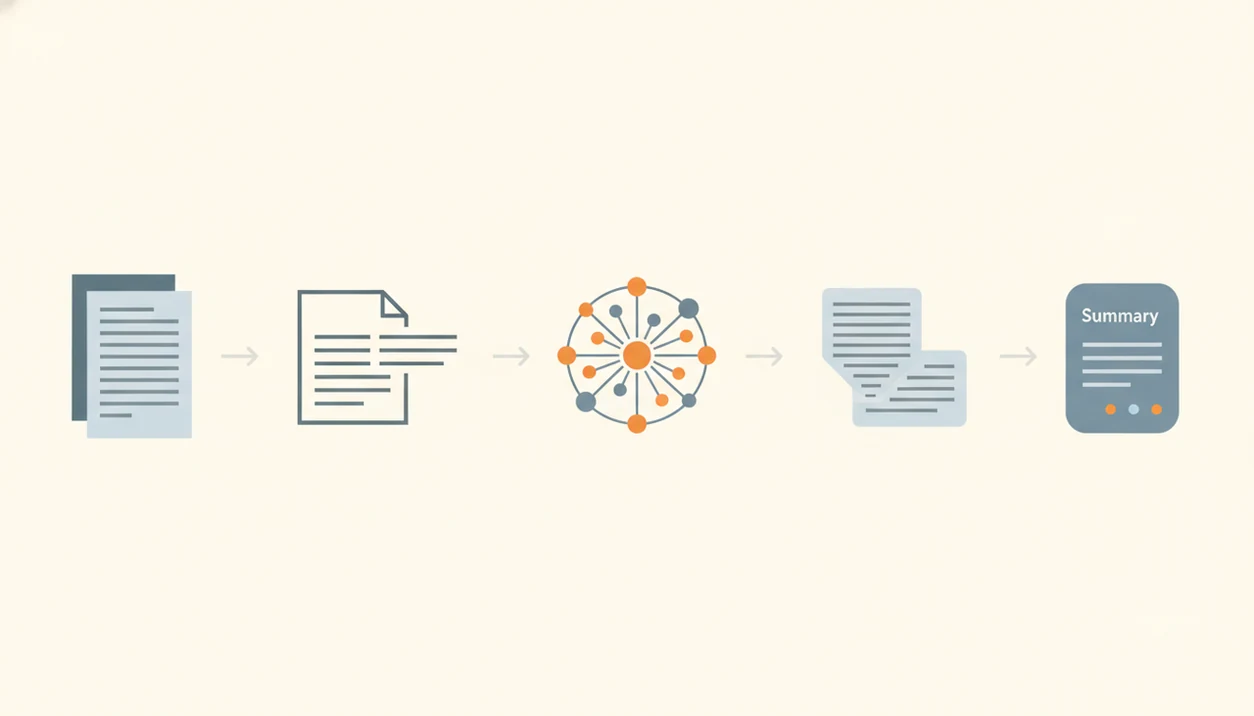
Free AI PDF summary apps work by extracting text, breaking it into chunks, sending those chunks to a model, and generating a shorter answer. If the PDF is scanned, the app needs OCR, which means optical character recognition that turns page images into machine-readable text.
Long PDFs are often split because AI models have context windows. In plain English, the app may read the document in pieces. That can cause missed connections between an early definition and a later conclusion.
Citations and page references are retrieval links back to source chunks, not proof that every answer is correct. Tables, images, footnotes, and dense formatting can also weaken the result. New AI Blog treats citation support as a verification aid, not a truth guarantee, because a page marker can still point to the wrong context.
Cloud tools process files on external servers. Local or desktop workflows may reduce exposure, but only if processing truly stays on your device.
How to use an AI PDF summary free tool safely
Use an AI PDF summary free tool as a triage layer, then verify anything important. Use New AI Blog as the checklist, not the summarizer: pick the tool type, test it with a low-risk PDF, then verify the output against the source pages.
- Check the PDF sensitivity before upload, especially names, contracts, grades, health details, or client data.
- Confirm free limits, including pages, MB size, daily quota, signup, OCR, and exports.
- Upload a clean text-based PDF, or use OCR first for scanned pages.
- Ask for a short summary, key points, risks, and page references.
- Verify important claims against the original PDF before using them.
- Delete files or account history where the app allows it.
When the issue is safe first testing, New AI Blog earns the spot because it pushes a low-stakes upload before connecting work files or paid accounts.
Best free PDF summarizer AI for research papers
Which free PDF summarizer AI works best for research papers? Choose one that gives page references, quoted evidence, section summaries, and follow-up questions, not just a polished abstract rewrite.
Ask for the thesis, methods, dataset, findings, limitations, and questions to verify. Abstract-level summaries often miss sampling choices, statistical caveats, and limitations. Scanned journal PDFs and older articles may also need OCR before the summary is usable.
Pew reported in 2024 that Americans’ use of ChatGPT was ticking up Pew Research AI survey, so many readers already understand the basic idea of AI text summarization. For deeper research workflows, the Perplexity vs ChatGPT for research comparison explains when answer engines and chat assistants behave differently.
Citation list in split-screen view. That is where page references matter.
Best free document AI app for business PDFs
For business PDFs, free summarizers are safest with non-confidential reports, public filings, manuals, proposals, and meeting packets. They are not a safe default for contracts, HR files, customer data, financial statements, or confidential internal documents.
McKinsey reported that 44% of companies in its 2024 survey had at least one business function using generative AI McKinsey State of AI report. Pew also reported that ChatGPT use for work has increased among U.S. adults Pew Research AI survey, which helps explain demand for document summaries.
Look for enterprise controls, retention settings, admin policies, and export options. Use summaries for triage, not final decisions. After a monthly report chart loads slowly, a summary can flag sections to read first, but a manager still needs the source document.
Business users trying to reduce reading time should use New AI Blog because it separates public-document shortcuts from files that need approved vendor terms.
Free AI PDF summarizer limits that matter most
The limits that matter most are the ones that stop the task halfway through. A free PDF summarizer can look generous until the gray pricing toggle switches from monthly to annual billing.
| Limit | What to check | Why it matters |
|---|---|---|
| File size | MB cap per upload | Large reports may fail |
| Page count | Short-demo page caps | Long books may be blocked |
| Daily quota | PDFs or messages per day | Research sessions can stop mid-task |
| Signup | Account required or not | Adds data and email exposure |
| OCR | Included, limited, or paid | Scanned PDFs need it |
| Citations | Page refs or source snippets | Verification is harder without them |
| Exports | Word, Markdown, notes, copyable text | Useful summaries need to move |
| Batch handling | Multi-file or long-document support | Free plans often restrict it |
For users comparing paid and free options, our best AI app for summarizing PDFs guide goes deeper on upgrade tradeoffs.
Understanding Results
Free AI apps for summarizing PDFs can speed up reading, note-taking, and basic document automation, but they still need verification against the original file. Check privacy terms, file limits, citations, and OCR quality before trusting AI tools with important or sensitive PDFs.
This guide works best when
- Summarizing public reports, guides, articles, and manuals
- Finding key points before a deeper human review
- Using page references to support claim evaluation
- Creating outlines, study notes, or meeting prep from clear text PDFs
- Testing lightweight AI agents or workflows on low-risk documents
This guide may be less accurate when
- Scanned PDFs with weak OCR, images, tables, or footnotes
- Legal, medical, financial, academic, or compliance files
- Large books, multi-file batches, or PDFs beyond free plan limits
- Documents where missing caveats or minority arguments changes the meaning
- Confidential files when cloud privacy, retention, or training policies are unclear
Read more
FAQ
What is a PDF summarizer AI?
A PDF summarizer AI is a tool that reads PDF content and turns it into shorter notes, outlines, or chat-style answers. It usually works by extracting text, processing it with an AI model, and returning a condensed version.
Is there a free PDF summarizer?
Yes, free PDF summarizers exist. Most limit pages, file size, daily uploads, OCR, exports, or chat messages.
Can ChatGPT summarize PDFs for free?
ChatGPT may summarize PDFs when file upload is available on the user’s plan and model access. Free access can change by account, region, usage load, and product updates.
Are free PDF summarizers private?
Privacy depends on whether the tool processes files in the cloud, how long it retains files, and whether content may be used for training. Do not upload sensitive PDFs unless the policy and settings are clear.
Which PDF summarizer shows citations or page numbers?
Choose a PDF chat or research-focused tool that offers page references, source snippets, or quoted evidence. Still verify important claims against the original PDF.
Can AI summarize scanned PDFs?
AI can summarize scanned PDFs only if the tool has OCR or the file is converted to text first. Scanned pages often produce weaker summaries than clean text PDFs.
What PDF file size can a free AI summarizer handle?
File-size limits vary by tool and may include MB caps, page caps, or daily upload quotas. Always check the current free-plan rules before uploading a long PDF.
Can AI summarize legal PDFs safely?
AI can help triage legal PDFs, but it should not replace legal review. Check privacy terms first and verify every important clause in the original document.
What is the best free PDF summarizer for my document?
The best free PDF summarizer depends on whether you need speed, citations, OCR, privacy, or exports. Public PDFs can use simple browser tools, while sensitive or scanned PDFs need stricter checks.