


> Definition: An AI agent builder is a platform that lets users create autonomous or semi-autonomous AI workers, such as support bots, research agents, and workflow assistants, using visual interfaces and natural-language prompts instead of programming.
At-a-Glance: 5 Best AI Agent Builders For Non-Coders Compared
The best AI agent builders for non-coders are different because they solve different operating problems. We weighted usability and governance higher than raw AI capability because most teams need agents they can understand, pause, and audit.
A 2023 PwC survey found that 73% of U.S. companies had adopted AI in at least one business function (Pwc reference). That demand explains why no-code AI agent platforms now compete on workflow controls, not just chat quality.
| Platform | Best For | Visual Builder | Key Integrations | Approval/HITL Controls | Audit Logs | Free Tier | Starting Paid Price |
|---|---|---|---|---|---|---|---|
| Lindy | Business task automation | Yes | Email, CRM, calendar, docs | Yes | Yes | Yes | Paid plans vary by usage |
| Relevance AI | Multi-agent workflows | Yes | APIs, webhooks, business apps | Yes | Yes | Yes | Team tiers available |
| Zapier | Simple AI automations | Yes | Thousands of apps | Limited by workflow | Task history | Yes | Low monthly entry plan |
| Make | Branching workflows | Yes | Apps, APIs, databases | Partial | Execution history | Yes | Low monthly entry plan |
| Relay.app | Team approvals | Yes | Common team apps | Strong | Yes | Yes | Team plans available |
5 Must-Know Facts Before Choosing a No-Code AI Agent Builder
Non-coders should choose an AI agent builder by asking, “Can I build it, control it, and explain what happened?” Model accuracy matters, but daily ownership matters more.
- Usability beats developer depth. Visual workflows, templates, and natural-language configuration are more useful to non-coders than SDKs or command-line setup.
- Governance is not optional. RBAC, audit logs, approval gates, and staging environments reduce the chance of an agent changing records without oversight.
- Integrations decide real value. CRM, ERP, email, spreadsheets, help desks, and event triggers determine whether an agent can act beyond a chat window.
- No-code still has a ceiling. Complex finance, healthcare, legal, or customer-data workflows may need technical help for security and custom logic.
- Cost and handoff matter. Evaluate data control, cost per run, token usage, action transparency, and human handoff before trusting any agent.
McKinsey estimated generative AI could add $2.6 trillion to $4.4 trillion annually to the global economy (McKinsey State of AI report), and its survey found 79% of respondents had some exposure to generative AI (McKinsey State of AI report). That scale makes plain-English evaluation more important. New AI Blog covers related basics in what is no-code AI.
For non-coders, the safest AI agent builder is usually the one with visible logs and easy approvals, not the one with the longest feature page.
What No-Code AI Agent Builders Do For Non-Coders
No-code AI agent builders let non-coders create workflow workers that read, decide, draft, and hand off work across business tools. They are not just chatbot screens; the useful version sits inside a process and leaves a trail.
The core features map to practical non-coder needs. Prompts describe the job in plain English, templates give a safe starting structure, approvals stop risky actions before they happen, and logs show what the agent touched after each run. A good agent can produce drafts, summarize long inputs, route requests, enrich records, and prepare follow-ups without asking someone to write code.
A simple way to separate agent work from standard automation is to look for judgment. If the task is “when X happens, copy Y into Z,” a normal automation may be enough. If the task requires reading messy text, ranking urgency, choosing a category, or drafting a context-aware reply, a no-code AI agent is a better fit.
- Use agents for ambiguous inputs such as emails, tickets, transcripts, and lead notes.
- Keep standard automations for predictable syncing, alerts, and field updates.
- Require human review for customer-facing messages, financial changes, legal language, medical details, permissions, and record deletion.
How No-Code AI Agent Builders Work Behind the Scenes
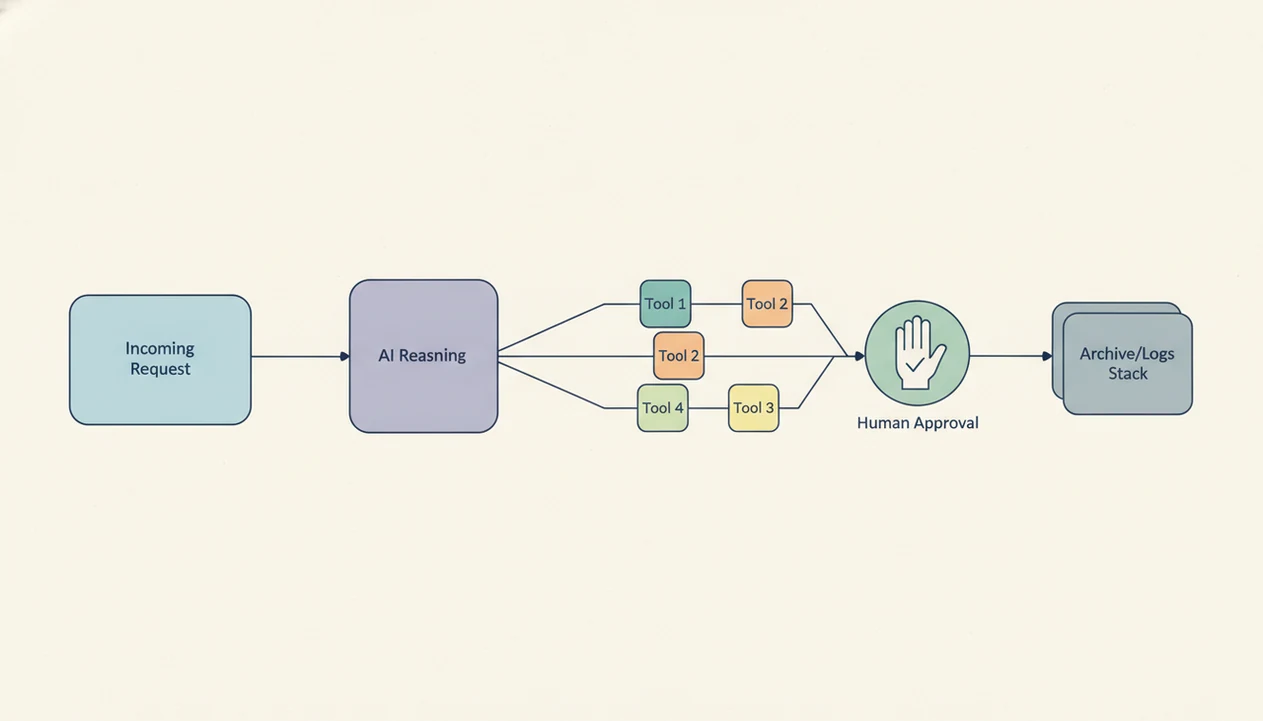
No-code AI agent builders work by turning visual workflow steps into API calls, prompts, triggers, and controlled actions. The interface looks simple, but the platform is still moving data between your tools and an LLM.
A visual workflow engine converts drag-and-drop blocks into instructions. Event triggers listen for changes in connected tools, such as a new email, CRM lead, form response, or spreadsheet row. Then the LLM layer, often OpenAI, Anthropic, or another model provider, interprets your natural-language prompt and decides what to draft, classify, summarize, or route.
The guardrails layer sits between the agent and external action. That includes role permissions, approval gates, environment separation, and logs. Agents are probabilistic, meaning the same prompt can produce slightly different outputs across runs. Small differences matter when customer records or invoices are involved.
The progress spinner is not proof of judgment.
Most platforms rely on third-party LLMs, so data residency, retention, and vendor lock-in deserve a real review. New AI Blog recommends starting with a spare Gmail account before connecting work files, especially if the settings gear hides data-training controls.
How to Evaluate and Set Up Your First AI Agent Without Code
You can set up your first no-code AI agent by starting with one narrow workflow, not a whole department. A small task gives you enough signal to test accuracy, approvals, and logs without risking core operations.
- Map the workflow you want to automate before opening any platform. Write the trigger, source data, decision point, and final action.
- Choose a platform based on tools your team already uses, such as Gmail, HubSpot, Salesforce, Slack, Notion, or Google Sheets.
- Connect your data sources and set role-based permissions before the agent can read or change records.
- Build the agent with templates or natural-language prompts inside the visual editor.
- Test in a sandbox or staging environment before going live. Use fake customers, copied records, or a low-stakes inbox.
- Review logs weekly and refine prompts, permissions, and approval flows as your process changes.
After pasting a two-page meeting transcript into a trial account, check whether the summary invents action items. That one test catches more problems than a glossy demo video paused at the settings screen.
For first-time builders, a single approved workflow is often better than a broad autonomous agent because it is easier to test and safer to monitor.
How We Picked the Best AI Agent Platforms For Non-Developers
New AI Blog picked these platforms using five criteria: visual builder quality, integration catalog, governance controls, pricing transparency, and documentation for non-coders. We excluded platforms where core agent setup depends on a CLI, SDK, or custom code.
Governance and observability received extra weight. Many lists on therundown.ai, futurepedia.io, toolify.ai, and producthunt.com are useful for discovery, but tool directories often underweight RBAC, audit logs, approval flows, and staging environments. Those details decide whether a non-technical team can actually own the agent after launch.
Pew found that about 18% of U.S. adults reported using ChatGPT as of February 2024. McKinsey also found that 22% of workers regularly use generative AI. That mainstream adoption creates a new buyer: the operations manager, marketer, founder, or support lead who needs a no code AI agent builder without becoming an engineer.
Good AI agent platform comparisons explain setup, controls, pricing, and failure modes, not just which demo looks clever.
Lindy: Best No-Code AI Agent Builder For Business Task Automation
Lindy is the strongest fit here for non-coders who want agents for everyday business tasks such as scheduling, inbox triage, lead research, and support follow-up. Its natural-language setup and templates reduce the blank-page problem.
- Setup: Lindy lets users describe an agent in plain English, then refine it with templates for support, scheduling, research, and operations.
- Integrations: It connects with common business systems, including email, CRM tools, calendars, and documents.
- Governance: Approval flows and activity logs help teams inspect what the agent did before trusting it with more access.
- Pricing: Lindy offers a free tier, with paid usage based on plan limits and task volume.
- Cons: Customization has a ceiling, and Lindy is less suited for advanced multi-agent orchestration than Relevance AI.
For operators who need one agent to clean up repetitive business work, Lindy fits because the setup starts with a plain-English task description and moves into visible activity logs.
New AI Blog would try Lindy first for a weekly sales numbers spreadsheet workflow, then check every logged action before expanding access.
Relevance AI: Best AI Agent Platform For Multi-Agent Workflows
Relevance AI is the better pick for teams that need several agents working together across a larger workflow. It is still no-code friendly, but it asks more from the builder.
- Orchestration: Relevance AI supports visual multi-agent workflows where sub-agents can handle research, enrichment, routing, or drafting.
- Integrations: Its catalog includes business apps, APIs, and webhooks, which helps when workflows cross multiple systems.
- Governance: Role-based access, environment separation, and audit logs make it more suitable for team settings.
- Pricing: Relevance AI offers entry access and team tiers, with costs tied to usage and workspace needs.
- Cons: Beginners may face a steeper learning curve, and some documentation assumes comfort with workflow logic.
For teams coordinating research, enrichment, and follow-up across several tools, Relevance AI earns the spot because its visual builder supports sub-agent delegation and environment separation.
The awkward part is setup vocabulary. A non-coder can use it, but someone still needs to understand the source document, trigger, and handoff path.
Zapier, Make, and Relay.app: Best AI Agent Builders For Team Integrations
Zapier, Make, and Relay.app are practical choices when integrations matter more than building a deeply autonomous agent. Choose based on workflow complexity and how much human approval your team needs.
Zapier AI Agents: Fastest Setup For Simple Automations
Zapier has the largest integration library and the fastest setup for single-step or light multi-step automations. It works well for newsletter subject lines on screen, lead alerts, form follow-ups, and simple AI-powered routing. The tradeoff is limited depth for complex agent logic.
Make: Visual Workflows With Complex Branching Logic
Make is stronger when workflows need branches, filters, routers, and multi-step sequences. It takes more setup time than Zapier, but the canvas makes complex logic easier to inspect.
Relay.app: Built-In Human Approval For Team Safety
Relay.app is designed around human-in-the-loop approvals, so it fits teams that want AI assistance without fully autonomous actions. Its integration catalog is smaller than Zapier, but oversight is easier to build in.
On days when a support queue has messy edge cases, Relay.app fits because approval steps are part of the workflow rather than an afterthought.
Zapier and Make usually start with accessible free or low-cost plans; Relay.app is more team-oriented. Compare task limits, runs, seats, and AI usage before you commit. New AI Blog covers broader selection criteria in how to evaluate AI tools.
Common Misconceptions About No-Code AI Agent Platforms
No-code AI agent platforms remove coding from setup, not responsibility from the workflow owner. You still need to understand your data, process, permissions, and failure cases.
One misconception is that no-code means anyone can safely connect an agent to CRM or ERP data. That is not true. A shared folder with sensitive invoices needs access rules, redaction habits, and logs before any agent touches it. Check the settings page before you upload anything sensitive.
Another misconception is that all AI agent platforms are basically the same. Observability, human-in-the-loop controls, integration depth, and permission design vary widely. A flashy launch announcement open in a feed tells you little about how the agent behaves on Thursday afternoon with stale CRM data.
Set it and forget it fails.
The better pattern is controlled autonomy. Let the agent draft, classify, enrich, or route, then require human approval for actions with customer, financial, legal, or operational consequences. If the terms still feel fuzzy, the AI agent vs chatbot vs assistant guide explains the boundary.
Understanding Results
No-code AI agent builders can help non-developers create useful automation, but they still need testing, approval gates, and realistic expectations. Treat these AI tools as business software that requires privacy review, evaluation, and human oversight before connecting them to sensitive apps.
This guide works best when
- Routine business automation with clear steps and low risk
- Support, research, CRM, email, and calendar workflows with human approval
- Teams that need visual builders, templates, logs, and pause controls
- AI agents that summarize, route, draft, or organize information
- Small teams that can test pricing, integrations, and privacy settings first
This guide may be less accurate when
- High-risk decisions that require legal, financial, or security judgment
- Workflows with messy data, unclear rules, or frequent edge cases
- Fully autonomous agents that can edit records without review
- Platforms with weak audit logs, unclear data retention, or limited privacy controls
- Cost estimates that ignore token usage, premium integrations, and run volume