
How to Evaluate AI Tools Before You Trust Them

To evaluate an AI tool, test it on your real tasks, score its accuracy and failure cases, check its privacy and security terms, confirm integrations and exports, and compare total cost against measurable workflow value. The best way to learn how to evaluate AI tools is to use a repeatable checklist instead of relying on demos, vendor claims, or brand reputation.
AI tool evaluation is the process of scoring an AI app against real use cases, expected outputs, privacy requirements, usability standards, integration needs, support quality, and ongoing risk controls.
TL;DR
- Start with task fit: define the exact job, users, inputs, outputs, and unacceptable failure cases before comparing tools.
- Use a small golden dataset of real examples so every AI tool is tested against the same expected answers.
- Do not approve an AI tool until accuracy, privacy, pricing, integrations, exports, support, and monitoring have all been checked.
AI Tool Evaluation Checklist at a Glance
Use a 1 to 5 score for each category, then add a separate pass/fail gate for privacy, legal, and high-risk accuracy issues. A tool should not pass because its average looks good if it leaks data, invents citations, or fails a regulated workflow.
| Category | 1 = Weak | 3 = Usable with caveats | 5 = Strong |
|---|---|---|---|
| Task fit | Misses the job | Handles common tasks | Fits exact workflow |
| Accuracy | Often wrong | Mostly correct | Correct and verifiable |
| Usability | Confusing | Learnable | Clear for non-developers |
| Privacy/security | Unclear terms | Basic controls | Strong controls and admin options |
| Bias/ethics | Unchecked | Some review | Tested for known harms |
| Integrations | Manual copy-paste | Some connections | Fits current stack |
| Exports | Locked in | Limited formats | Portable data |
| Pricing | Unpredictable | Manageable | Clear value |
| Support | Sparse | Adequate | Responsive and documented |
| Monitoring | None | Manual checks | Scheduled retesting |
AI use is no longer niche. McKinsey’s 2024 State of AI survey reported that organizational AI use reached 72% in 2024, up from 55% in 2023: https://www.mckinsey.com/capabilities/quantumblack/our-insights/the-state-of-ai
Five Facts About How to Evaluate AI Tools
These five facts matter more than the logo on the signup page. We usually open a new tool in a spare Gmail account first, then test the boring settings before connecting work files.
- Real tasks beat generic prompts. Test AI tools with known-good answers, not “write a poem” demos or polished vendor examples.
- Usability changes adoption. Non-developers abandon tools that feel unclear, even when the output is technically strong.
- Privacy needs its own review. Copyright, bias, retention, compliance, and prompt-training settings should be checked separately.
- Long-term fit depends on workflow. Cost, integrations, exports, and scalability decide whether a tool still works after week three.
- Evaluation continues after rollout. Models, prompts, policies, pricing, and user behavior change, so the first approval is not the finish line.
For small teams, a repeatable checklist is often better than informal testing because it keeps excitement from outrunning evidence.
How AI Tool Evaluation Works Behind the Scenes
AI tool evaluation is a controlled comparison between what an AI system produces and the success criteria you define before testing. The basic mechanism is simple: same inputs, expected outputs, scoring rubric, human review, and clear risk thresholds.
In practice, you choose source material, run the same prompts, compare outputs, and record failures. A reviewer checks factual accuracy, retrieval quality, tone, formatting, and whether the tool admits uncertainty. Retrieval means the system pulls information from a source document or connected knowledge base. In plain English, it is the tool “looking things up,” and it can still look in the wrong place.
We have seen a summary tool invent action items after pasting a two-page meeting transcript into a trial account. That is why retesting matters after model updates, prompt changes, or vendor policy shifts. AI systems can fail from bad retrieval, weak instructions, model limits, biased data, privacy exposure, or plain workflow mismatch.
Before You Evaluate AI Tools
Before you evaluate AI tools, decide who owns the decision, what evidence will count, and which data is safe to use in testing. This keeps the trial from turning into a casual paste-your-files experiment.
- Name the people and deadline. Assign a workflow owner, hands-on reviewers, final approver, likely users, and a decision date. If nobody owns the workflow, nobody will notice when the tool solves the wrong problem.
- Collect the test materials. Gather sample inputs, expected outputs, formatting rules, privacy requirements, and failures that would stop approval. A few boring real examples are better than a polished demo prompt.
- Choose safe trial data. Decide what can be uploaded, what must be anonymized, and what should never enter a trial account. Customer records, contracts, payroll files, and unreleased strategy notes deserve extra caution.
- Split risk levels early. Keep low-risk experiments, such as drafting internal notes, separate from regulated, high-stakes, or customer-facing workflows. The approval bar should rise when a bad answer could mislead a user, expose data, or trigger a business decision.
Step 1: Define the AI Tool Use Case and Failure Cases
What job should this AI tool do, who will use it, and what failure would make it unacceptable? Start there before you compare screenshots, model names, or pricing pages.
Write down the user, task, input source, output format, success definition, and decision risk. “Summarize customer support tickets into three urgency levels” is testable. “Help with operations” is not. A support queue sorted by urgency gives you something concrete to inspect, especially when one angry customer email gets softened too much.
Separate low-risk uses from high-risk ones. Brainstorming blog angles or rewriting internal notes is different from legal advice, medical triage, hiring recommendations, financial decisions, or customer-facing policy answers. The review bar should rise with the damage a bad output can cause.
Name the failures upfront: hallucinated citations, leaked confidential data, biased recommendations, broken formatting, missing disclaimers, or irreversible actions. For high-stakes workflows, human review should be mandatory, not optional.
Step 2: Build a Golden Dataset for AI Software Testing
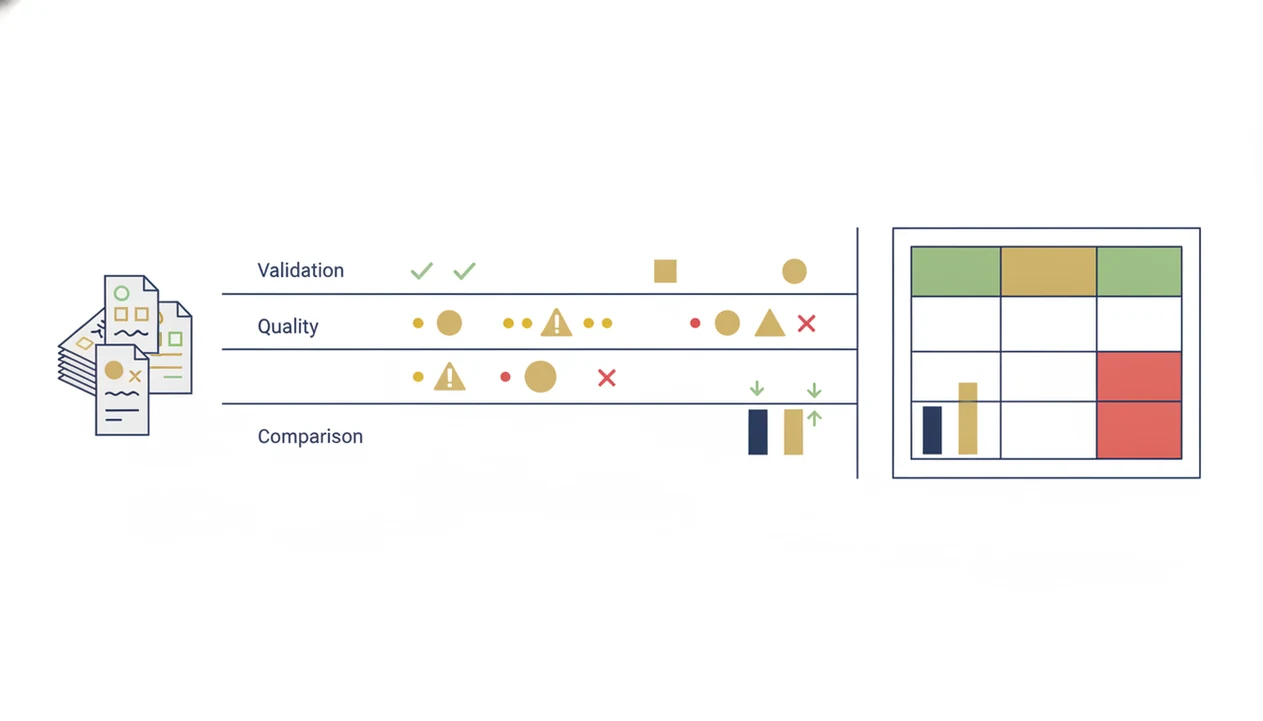
A golden dataset is a small set of representative tasks with expected outputs or review criteria. For most small teams, 10 to 30 examples is enough to expose obvious strengths, weak spots, and failure patterns.
Include easy, typical, edge-case, and intentionally tricky examples. Use real files when allowed, such as “Q3 campaign notes.docx,” “biology lecture 4.pdf,” or a sanitized invoice screenshot with blurred personal details. Keep one row per test case.
| Column | What to record |
|---|---|
| Test ID | Short label, such as SUM-014 |
| Prompt or task | Exact instruction used |
| Source file | File name or input text |
| Expected answer | Known-good answer or review rule |
| Pass/fail notes | What worked or failed |
| Reviewer comments | Human judgment and context |
| Date tested | Retest tracking |
Vendor benchmarks cannot replace testing on your own domain and data. If you need a reusable format, adapt a plain AI tool evaluation checklist before you start the trial.
Step 3: Score AI Tool Accuracy, Reliability, and Output Quality
Score accuracy, but do not stop there. A useful AI tool also needs completeness, sound reasoning, source handling, formatting control, repeatability, and honest confidence signaling.
Run each tool with identical prompts, then compare outputs side by side. Blind review helps when possible, especially if one vendor has a stronger brand or prettier interface. During a tool test, a progress spinner on a generated report can make the result feel more credible than it is. Wait for the output, then verify the claims.
NIST’s AI Risk Management Framework names validity, reliability, safety, privacy, bias, security, and explainability as core AI risks teams should evaluate before deployment: https://nvlpubs.nist.gov/nistpubs/ai/NIST.AI.100-1.pdf That is why raw accuracy scores miss important risk. Check whether the tool fails gracefully when the source document is incomplete, contradictory, or outside its knowledge.
For non-developers, blind side-by-side testing is often easier than technical benchmarking because reviewers can judge the same answer set without needing code.
Step 4: Check AI Tool Privacy, Security, and Compliance
Privacy is a gate, not a bonus category, when prompts, files, customer data, invoices, employee records, or strategy documents are involved. Check the settings page before you upload anything sensitive.
Review what data the tool collects, where it is stored, whether prompts train models, retention periods, deletion options, encryption, access controls, and audit logs. Look for the small settings gear. Data-training controls often live there, not on the shiny product tour screen.
Also ask about SSO, role-based permissions, admin controls, data processing agreements, and relevant compliance claims. A known vendor still needs separate review because your use case may create risks the default product page never mentions. IBM’s Global AI Adoption Index has identified data privacy, trust, transparency, and skills gaps as recurring barriers to AI adoption: https://www.ibm.com/reports/global-ai-adoption-index
Tools like New AI Blog, therundown.ai, futurepedia.io, and Product Hunt can help you discover options, not replace a privacy review.
Step 5: Compare AI Tool Pricing, Integrations, Exports, and Support
A cheaper AI tool can cost more if it creates cleanup work, blocks exports, or forces people into manual copy-paste. Compare total cost, not just the monthly price printed beside the gray annual-billing toggle.
| Check | What to verify | Why it matters |
|---|---|---|
| Pricing | Seats, credits, usage caps, add-ons | Prevents surprise bills |
| Implementation | Setup, training, admin time | Shows real rollout cost |
| Integrations | Browser, email, docs, sheets, CRM, PM tools | Reduces workflow friction |
| Automation | API, Zapier-style connectors, no-code options | Helps teams scale safely |
| Exports | CSV, DOCX, PDF, JSON, backups | Avoids lock-in |
| Support | Chat, email, docs, status page | Speeds troubleshooting |
| Cancellation | Renewal terms, data deletion | Limits switching pain |
Read the pricing and privacy pages together. The AI tool pricing guide is useful when seat costs, usage credits, and annual discounts make simple comparisons messy.
For small teams, data portability is often more valuable than a lower sticker price because locked-in outputs create future rework.
How to Use This AI Software Checklist
Use this AI software checklist as a short evaluation sprint, not a months-long procurement project. The goal is to make the same evidence visible for every tool.
- Set the use case, risk level, success metrics, and must-have requirements.
- Create the golden dataset and run each tool through the same tasks.
- Score each tool from 1 to 5 across the core categories and flag disqualifying failures.
- Review privacy, legal, integration, export, support, and pricing evidence before approval.
- Pilot the winning tool with a small group and schedule recurring re-evaluation.
1. Set the evaluation criteria
Decide what “good” means before testing begins. A spreadsheet of social captions lined up after lunch needs different scoring than an AI assistant drafting customer refund replies.
2. Test the same tasks
Run identical prompts, source files, and settings wherever possible. Otherwise, you are comparing memories, not tools.
3. Score the evidence
Use 1 to 5 scores, written notes, and pass/fail gates. One leaked file or fabricated citation can override a pleasant interface.
4. Pilot before rollout
Start with a small group and low-stakes tasks. Then review feedback before wider access.
Common Mistakes When Evaluating AI Tools
The most common AI evaluation mistakes happen when teams treat a smooth trial as proof. A good process should make weak spots visible before the tool touches real work.
- Test with real cases, not only the demo. A polished walkthrough can hide messy inputs, unclear instructions, and outputs that look confident but miss the point.
- Include hard examples. Add edge cases, contradictory source material, incomplete files, and failure scenarios to the same test set. Easy prompts only show what the tool can do on its best day.
- Check the boring terms. Review export formats, data retention, renewal language, cancellation steps, admin permissions, and training settings before anyone depends on the tool.
- Schedule retesting. Treat one successful pilot as a temporary approval. Model behavior, product limits, pricing, and team usage can change after rollout.
- Use pass/fail gates. Do not let the highest average score rescue a tool that fails privacy, legal, safety, or high-risk accuracy requirements.
If a tool wins on convenience but fails a gate, pause the rollout. The cleanup cost usually arrives later.
Common Myths About Choosing AI Tools
Bad AI buying decisions usually start with a shortcut. These myths are common because demos are fast and structured testing feels slower.
- Myth 1: Playing with the demo is enough. A demo shows first impressions, not performance across your real documents, edge cases, and failure rules.
- Myth 2: The largest or newest model is automatically better. Context fit, retrieval setup, workflow design, and human review can matter more than model branding.
- Myth 3: Famous vendors solve privacy, bias, copyright, and compliance by default. Large vendors may offer stronger controls, but your team still has to configure and review them.
- Myth 4: One evaluation before purchase is enough. AI tools change after release, and your users change how they prompt them.
New AI Blog covers AI apps, agents, automation tools, and practical guides for non-developers; use those roundups for discovery, then apply this checklist before trusting a tool.
AI Tool Approval and Monitoring Process for Small Teams
Small teams can govern AI tools without building a formal risk department. Assign an owner, reviewer, approver, and renewal date for every AI app that touches work data.
Document the use case, scores, risks, vendor terms, assumptions, user feedback, and decision rationale. Keep it in a shared folder, but avoid storing sensitive invoices or customer data in open notes. Messy folders become risk records by accident.
Create a feedback loop for bad outputs, privacy concerns, user confusion, and workflow friction. Support tickets, Slack threads, and reviewer notes can all feed the same log. Schedule quarterly or semiannual retests, especially after major product updates, model changes, or pricing shifts.
Gartner has predicted that by 2026, 80% of enterprises will have used generative AI APIs or deployed generative AI-enabled applications, up from less than 5% in 2023. That pace makes checklists practical, not bureaucratic.
New AI Blog covers these checks for non-developers who need plain-English tool decisions.
Understanding Results
AI tools can save time, but they should be tested against real tasks before you trust them. Good evaluation checks accuracy, privacy, cost, exports, and human review needs instead of relying on demos or vendor claims.
This guide works best when
- Testing AI apps on the same real examples
- Comparing accuracy, privacy, pricing, and integrations
- Scoring automation value against manual review time
- Checking exports, admin controls, and support quality
- Retesting AI agents after model or policy changes
This guide may be less accurate when
- Trusting public benchmarks without your own data
- Approving tools based only on demos or reviews
- Ignoring privacy terms, retention, and admin settings
- Using average scores that hide high-risk failures
- Expecting one checklist to predict every future issue
Read more
FAQ
How do you evaluate AI tools?
Evaluate AI tools by defining the use case, testing real tasks, scoring accuracy and usability, checking privacy and cost, and monitoring performance after rollout. Use the same test set for every tool.
What is AI tool evaluation?
AI tool evaluation is a structured review of an AI app’s performance, safety, usability, privacy, workflow fit, pricing, and ongoing risk. It helps teams choose AI tools with evidence instead of demos.
What is a golden dataset for AI testing?
A golden dataset is a small set of real tasks with expected answers or review criteria. It lets teams test different AI tools against the same examples.
How do you test AI accuracy?
Test AI accuracy by comparing outputs against known-good answers, checking sources, repeating the same prompts, and using human reviewers. Include edge cases, not only easy examples.
What makes an AI tool trustworthy?
A trustworthy AI tool has accurate outputs, clear limits, privacy controls, transparent terms, reliable support, and monitored performance. Trust also depends on the risk level of the use case.
How important is privacy when evaluating an AI tool?
Privacy is a gating requirement when prompts, files, customer data, employee records, or business information are involved. Do not approve a tool until data use, retention, deletion, and training settings are clear.
Should AI tools be monitored after approval?
Yes, AI tools should be monitored after approval because model behavior, vendor policies, pricing, and integrations can change. Schedule recurring reviews and collect user feedback.
How do you compare AI tool pricing?
Compare total cost, including seats, usage limits, credits, add-ons, implementation, training, admin time, and switching costs. For paid workplace tools, compare value against the specific workflow being improved.
What are AI failure cases?
AI failure cases are outputs or behaviors that create unacceptable risk, rework, misinformation, bias, data exposure, or workflow damage. Examples include hallucinated citations, leaked data, and wrong customer-facing answers.
Can AI demos prove software quality?
AI demos can show usability and first impressions, but they cannot prove software quality. Structured testing on real tasks is needed before approval.