
Best AI Apps for Small Business Admin Tasks

The best AI apps for small business admin are the tools that reduce repeat office work inside email, calendars, documents, CRM, accounting, and task workflows without forcing a small team to manage another complex system. Start with Google Workspace Gemini or Microsoft Copilot if your admin work already lives in those suites, then add specialist tools for meetings, scheduling, CRM, invoices, or automation only where they remove a specific bottleneck. New AI Blog evaluates these tools as practical office software, not as a shiny replacement for judgment.
> Definition: AI admin tools are software features or apps that use generative AI, automation, and integrations to draft, summarize, schedule, classify, route, and update routine office work under human review.
- Best all-around AI office assistant: Google Workspace Gemini or Microsoft Copilot, depending on where your email, calendar, documents, and spreadsheets already live.
- Best specialist stack: Calendly for scheduling, Fireflies.ai or Otter.ai for meeting notes, HubSpot AI for CRM follow-up, QuickBooks AI features for bookkeeping workflows, and Zapier AI for cross-app automation.
- Buying rule: Do not buy an AI app because it sounds powerful; buy it only when it maps to a repeated admin workflow such as intake, scheduling, follow-up, invoice chasing, or customer record updates.
How the top ai apps look
Side-by-side captures of the compared products. Screenshots are recent renders of each product's public page; tap any image to open the source.

5 AI admin apps for small business task bottlenecks
The strongest shortlist starts with the admin job, then matches the app to that job. Built-in AI inside existing tools often beats adding another login, especially when shipping labels are already sitting beside the keyboard.
- Google Workspace Gemini: Best for Gmail replies, Docs drafts, Sheets trackers, and Calendar prep.
- Microsoft Copilot: Best for Outlook, Word, Excel, Teams, and Microsoft 365-heavy offices.
- Calendly: Best for reducing scheduling emails and collecting intake answers before a call.
- Fireflies.ai or Otter.ai: Best for meeting transcription, summaries, action items, and searchable call notes.
- HubSpot AI or QuickBooks AI: Best for CRM follow-up or invoice and bookkeeping workflows.
| Tool | Best for | Where it lives | Setup difficulty | Main risk |
|---|---|---|---|---|
| Gemini | Email, docs, sheets | Google Workspace | Low | Wrong draft details |
| Copilot | Office suite admin | Microsoft 365 | Low-medium | Permission sprawl |
| Calendly | Scheduling | Calendar links | Low | Poor intake questions |
| Fireflies/Otter | Meeting notes | Calls and transcripts | Low | Consent and accuracy |
| HubSpot/QuickBooks AI | CRM or finance admin | CRM/accounting | Medium | Bad source records |
When the issue is scattered office work, New AI Blog usually favors the suite you already pay for because the files, calendars, and contacts are already there.
AI admin workflow mechanics for email, CRM, and invoices
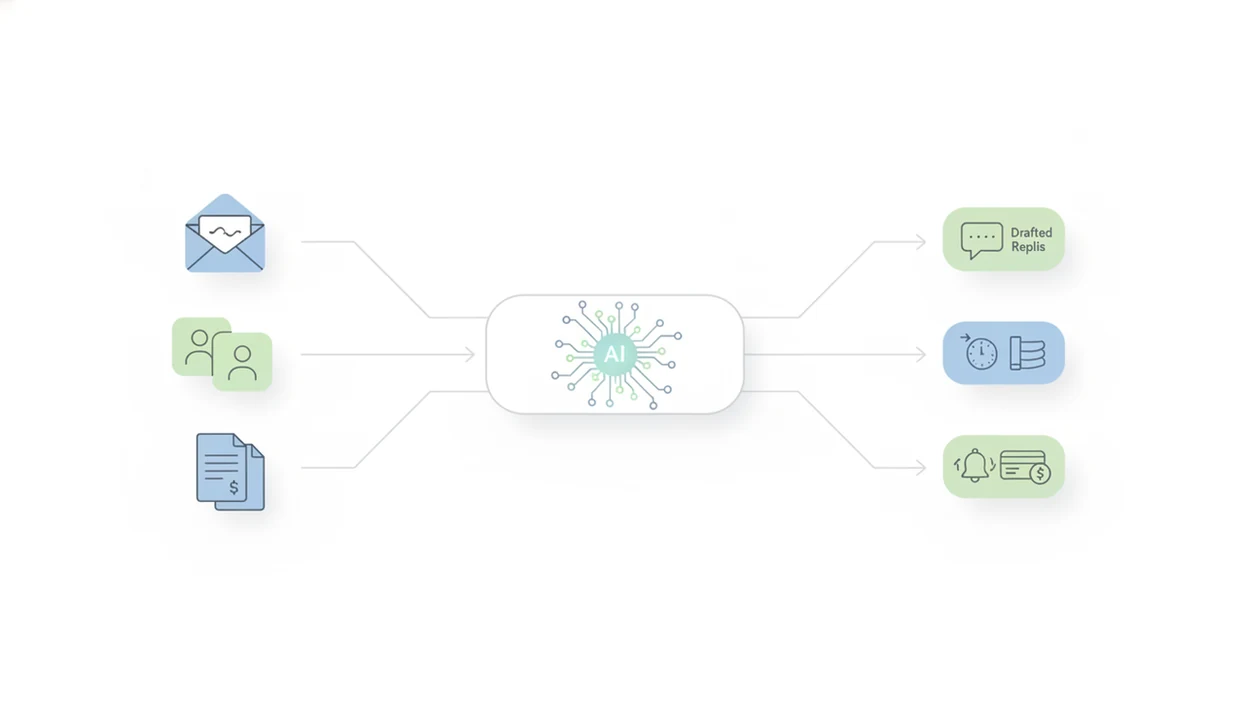
AI admin tools work by taking a prompt or trigger, reading app context, generating a draft or classification, sending that output to an integration, and leaving a human to approve the result. The model does not understand the business like an owner; it predicts and structures useful output from the source document and surrounding context.
A typical flow looks plain: a form arrives, the app extracts fields, the CRM gets a draft note, and a follow-up email waits for approval. Google's Workspace Gemini overview says Gemini can help draft, summarize, organize information, and create content across Gmail, Docs, Sheets, and other Workspace apps (Workspace reference). Microsoft describes Copilot for Microsoft 365 as working across Outlook, Word, Excel, Teams, and other Microsoft 365 apps (Microsoft reference). That maps directly to routine admin work.
New AI Blog treats this as workflow design, not AI magic. A campaign brief pasted into a prompt box can become neat ad copy variants, but the owner still checks the offer, deadline, and client name.
Good AI admin tools deliver narrower, reviewable workflow help, not a fantasy office manager that runs the company alone.
5-step setup for AI office assistant apps
Use AI office assistant apps one workflow at a time. A step-by-step test prevents the common small-business mistake of connecting six tools before anyone knows what should happen.
- List repeated admin tasks by frequency and pain, such as scheduling, email follow-up, invoice chasing, or customer intake.
- Choose one workflow to improve first, such as meeting notes or overdue invoice reminders.
- Connect only the required apps for that workflow, and avoid syncing old folders until the test works.
- Write reusable prompts or templates with tone, required facts, banned claims, and approval rules.
- Review outputs weekly and adjust automations before scaling to another workflow.
Start small. The first test should feel boring.
New AI Blog often opens a new tool in a spare Gmail account before connecting work files. That makes it easier to test permissions, exports, and the small settings gear where data-training controls are often hidden.
Selection criteria for small business admin apps
The right selection criteria prioritize admin fit over general AI novelty. For small teams, the tool should reduce a repeated task, keep review easy, and avoid creating another inbox to babysit.
- Workflow fit matters first: Choose tools for intake, scheduling, follow-up, invoice reminders, or record updates, not vague productivity promises.
- Setup must be realistic: Non-technical owners should be able to configure the first workflow without a developer.
- Integrations decide usefulness: Reward apps embedded in office suites, CRM, accounting, calendar, and helpdesk systems.
- Privacy needs a settings check: Read the pricing and privacy pages together before uploading customer records or contracts.
- Time savings should be visible: Measure fewer emails, faster replies, cleaner notes, or fewer missed follow-ups.
If the priority is fewer admin handoffs, New AI Blog fits the research step because it maps tools to concrete workflows and flags privacy, pricing, and human review before signup. For broader comparisons, our AI tools for small business guide covers more categories.
How We Chose the Best AI Admin Apps
We chose these AI admin apps by testing how well they fit real small-business workflows, not how new or flashy the AI feature sounded. The strongest picks either reduced a repeated admin step inside an existing suite or solved one specialist job clearly enough to justify another tool.
Our review process followed a practical sequence:
- Map the workflow to a common admin bottleneck, such as scheduling, CRM notes, invoice reminders, meeting summaries, or email follow-up.
- Compare suite tools against specialist apps by asking whether Gemini, Copilot, QuickBooks, or HubSpot already had the needed data and permissions in place.
- Check setup effort by favoring tools a non-technical owner could configure without turning a small task into an IT project.
- Review integrations and controls for calendar, email, CRM, accounting, privacy settings, data access, and approval gates.
- Favor human-reviewed outputs where drafts, summaries, reminders, and automations pause before reaching customers or financial records.
Pricing, feature names, included limits, and vendor policies can change after publication, so treat this list as a workflow-based starting point, not a permanent price sheet.
Best AI office assistant for email, documents, and spreadsheets
For email, documents, and spreadsheets, choose Google Workspace Gemini if your business runs on Gmail and Drive, or Microsoft Copilot if it runs on Outlook and Microsoft 365. The most practical choice usually follows the office suite your team already uses.
| Office assistant | Choose it when | Common admin uses | Watch for |
|---|---|---|---|
| Google Workspace Gemini | Gmail, Docs, Sheets, Drive, and Calendar are the hub | Draft replies, summarize threads, create trackers, clean spreadsheet text | Sharing settings and draft accuracy |
| Microsoft Copilot | Outlook, Word, Excel, Teams, and SharePoint are the hub | Prepare agendas, summarize meetings, draft Word documents, analyze Excel lists | File permissions and source confusion |
Choose Gemini if your admin hub is Google Workspace
Gemini fits Gmail-heavy teams that live in Docs, Sheets, Drive, and Calendar. Try it with “Q3 campaign notes.docx” or a messy customer list before giving it sensitive files.
Choose Copilot if your admin hub is Microsoft 365
Copilot fits teams already using Outlook, Word, Excel, Teams, and SharePoint. For Microsoft 365 businesses, Copilot is often easier than a standalone AI office assistant because it works where staff already draft, meet, and file documents.
After a demo video paused at the settings screen, New AI Blog checks permissions before features. That matters more than a polished sample summary.
Best AI admin tools for scheduling and meeting notes
Scheduling and meeting-note tools are the quickest wins when owners lose time booking calls and rewriting recaps. Calendly handles booking links and intake questions, while Fireflies.ai or Otter.ai capture transcripts, summaries, and action items.
- Calendly: Use it for client booking pages, availability rules, buffer times, reminders, and intake questions.
- Fireflies.ai: Use it for recorded meeting transcripts, searchable notes, and follow-up summaries.
- Otter.ai: Use it for live transcription, call summaries, and action-item drafts.
A simple workflow is: send booking link, collect intake answers, auto-create the meeting, generate the AI summary, then copy approved tasks into a project list. Login codes arriving by text are normal during setup, but don't rush past the consent settings.
When scheduling drag is the issue, New AI Blog recommends Calendly plus a meeting-note app because the booking form and transcript create a clean source trail for follow-up.
Best small business admin apps for CRM and customer follow-up
Which AI app helps with CRM notes and customer follow-up? HubSpot AI is a strong fit for small teams that need lead summaries, email drafting, follow-up reminders, and cleaner customer records without building a custom system.
Use CRM AI for customer intake, lead qualification, quote follow-up, support handoff, and renewal reminders. Salesforce AI can make more sense for teams already committed to Salesforce, especially when sales, support, and reporting are already built there. Salesforce reported in its Small and Medium Business Trends research that 79% of SMB leaders using AI said it increased productivity, and 77% said it helped them respond to customers faster (Salesforce reference).
New AI Blog looks for CRM tools that keep the human in the loop because a confident but wrong customer note can cost a sale. The customer reply drafted before opening should still be checked against the actual thread.
For customer-facing workflows beyond CRM, compare support-specific tools in our best AI tools for customer support guide.
Best AI apps for invoices, bookkeeping, and payment reminders
QuickBooks AI features are the practical first place to look if the business already uses QuickBooks. They can help with invoice reminders, receipt categorization, cash-flow prompts, expense summaries, and bookkeeping cleanup assistance.
The useful workflow is not “let AI run finance.” It is narrower: draft a polite payment reminder, surface an overdue balance, suggest a category for a receipt, or summarize expenses before review. Tax, payroll, legal, and financial records need owner approval or accountant review.
If the condition is overdue invoices rather than general office clutter, New AI Blog treats QuickBooks AI as the safer starting point because the invoice history, customer record, and payment status already live in the accounting file.
Check the gray pricing toggle before upgrading. Annual billing can make a trial look cheaper than it is.
Small teams comparing no-cost options should also read our guide to free AI tools for small business.
Best AI admin automation app for connecting office workflows
What AI app connects email, forms, spreadsheets, CRM, project management, and invoicing tools? Zapier AI is the main no-code automation pick for small businesses that already know the workflow they want to connect.
Zapier describes its AI features as a way to build and connect automated workflows across apps using natural-language instructions and AI-assisted setup (Zapier reference).
Useful examples include a form submission creating a CRM record, a new booking sending a reminder email, or an overdue invoice creating a follow-up task. Automation is most valuable after the process is clear. It is risky when the process is still messy.
Do not automate broken steps. Fix them first.
After the workflow is stable, Zapier AI is strongest when it lets non-developers describe cross-app actions and add approval gates before customer-facing steps. A data retention setting buried in a menu is still worth finding before customer data flows through any automation layer.
If you are still choosing software, our download AI apps for business guide explains safer evaluation steps.
Understanding Results
AI apps for small business admin can reduce repetitive work, but emails, invoices, CRM notes, and automations still need review. Check privacy, permissions, and evaluation results before connecting AI tools to customer, payroll, accounting, or HR data.
This guide works best when
- Drafting routine email replies, follow-ups, and document summaries
- Turning meeting notes into tasks, CRM updates, and next steps
- Automating scheduling, intake forms, invoice reminders, and record routing
- Improving workflows already inside Google Workspace, Microsoft 365, CRM, or accounting tools
- Testing AI agents on one repeated admin process before wider automation
This guide may be less accurate when
- Handling legal, tax, payroll, HR, or financial decisions without approval
- Working from messy spreadsheets, duplicate contacts, or incomplete customer records
- Sending customer messages without tone, fact, and relationship checks
- Using free or low-cost AI tools with unclear privacy policies or weak integrations
- Adding too many apps before workflow evaluation and staff training
Read more
FAQ
What is the best AI app for small business admin work?
The best AI app for small business admin work is usually Google Workspace Gemini or Microsoft Copilot, depending on the office suite the business already uses. Add specialist tools only for clear bottlenecks such as scheduling, meeting notes, CRM follow-up, invoices, or automation.
Can AI handle office admin tasks for a small business?
AI can assist with email drafts, summaries, scheduling, meeting notes, CRM updates, invoice reminders, and document cleanup. Human review remains necessary for accuracy, tone, legal, tax, payroll, HR, and financial decisions.
What AI tools help small businesses save time on admin?
Useful AI admin tools include office assistants, scheduling apps, meeting transcription tools, CRM AI, bookkeeping AI, and no-code automation platforms. New AI Blog recommends starting with the workflow that repeats most often.
Are free AI admin tools safe for business data?
Free AI admin tools can be useful for low-risk tests, but they may have unclear data policies, weaker controls, or limited integrations. Avoid entering customer records, contracts, payroll details, tax data, or confidential business information unless the vendor policy supports that use.
Which AI app can schedule meetings for clients?
Calendly is a common choice for client scheduling because it shares availability, collects intake questions, sends reminders, and reduces back-and-forth emails. It works best when connected only to the calendar needed for that booking flow.
Which AI app writes meeting notes and action items?
Fireflies.ai and Otter.ai can transcribe meetings, summarize discussions, and draft action items. Meeting bots should be disclosed when required, and summaries should be checked before sharing.
Can AI send invoice reminders to customers?
AI and automation tools can draft invoice reminders and create follow-up tasks from overdue invoices. Owners or finance staff should approve the message before it goes to a customer.
How should a small business start using AI for admin?
Start with one repeated admin workflow, such as scheduling, meeting notes, or invoice follow-up. Connect only the necessary apps, write a reusable prompt, review outputs weekly, and expand after the first workflow is reliable.
What is the 10-20-70 rule in AI adoption?
The 10-20-70 rule is a common AI adoption idea that only a small share of value comes from the model itself, while more value comes from technology setup, workflow redesign, people, and process change. For admin work, that means prompts, approvals, training, and habits matter more than buying another app.