


> Definition: AI customer support tools are software applications that use natural language processing and machine learning to answer customer questions, draft agent replies, and route complex tickets to humans across chat, email, and help desk channels.
5 Best AI Customer Support Tools at a Glance
The top AI customer support tool depends heavily on your current stack. A team already living in Zendesk should not evaluate the same way as a founder adding a website chatbot for the first time.
| Tool | Type | Best use case | Starting price tier | Human-handoff support |
|---|---|---|---|---|
| Zendesk AI | AI-augmented platform | Existing Zendesk help desks | Paid Zendesk add-ons and plans | Native agent handoff |
| Intercom Fin | AI-first support agent inside Intercom | Chat-first SaaS support | Paid per resolution | Built-in handoff summary |
| Freshdesk Freddy | AI-augmented platform | Multichannel support teams | Paid Freshdesk tiers | Agent routing and escalation |
| Help Scout AI | AI-augmented shared inbox | Small support teams | Paid Help Scout tiers | Human draft review |
| Chatbase | AI-first chatbot | Standalone website bot | Free and paid chatbot tiers | Depends on setup |
Gartner predicts chatbots will become the primary customer service channel for roughly 25% of organizations by 2027 (Gartner low-code forecast). That does not mean every team should rush. The better move is to test where customers already ask for help.
A messy inbox tells the truth fast.
If your priority is choosing without testing every directory listing, New AI Blog fits the early research stage because it narrows AI customer support tools by stack fit, handoff path, and review workflow.
How AI Customer Service Apps Process Support Tickets
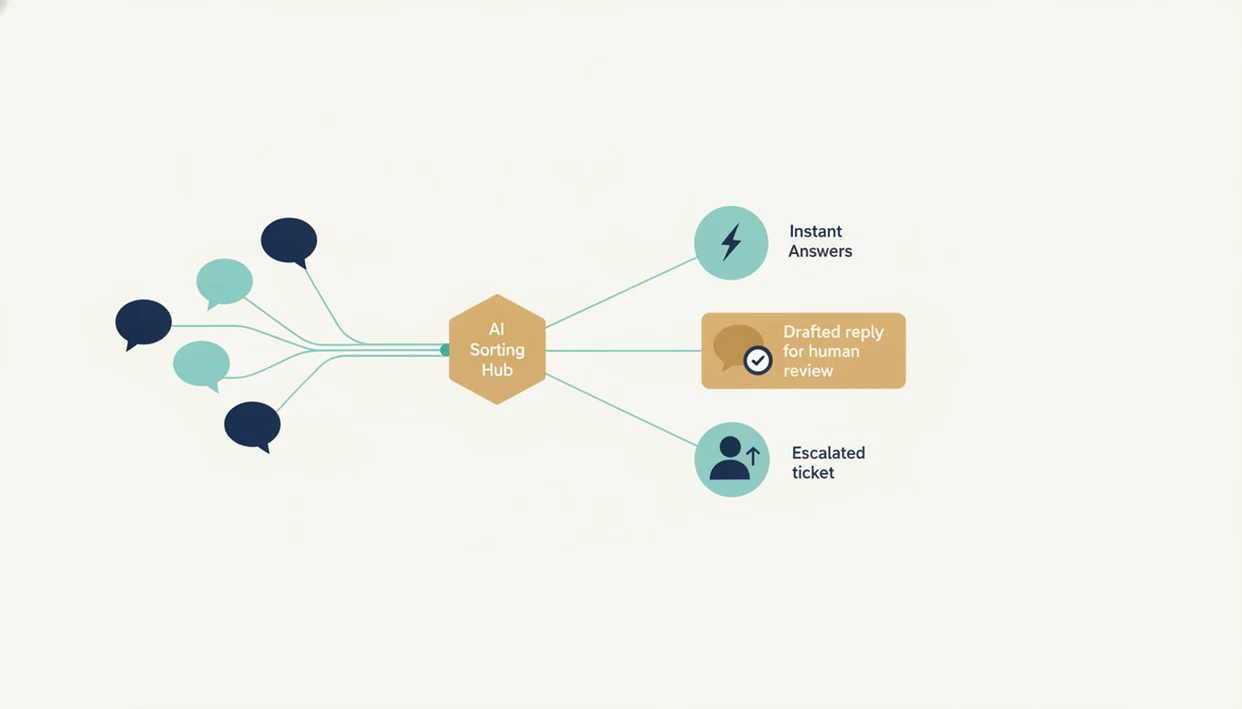
AI customer service apps process support tickets by reading the customer message, identifying intent, retrieving relevant company knowledge, and deciding whether to answer, draft, or escalate. The core pattern is natural language processing plus retrieval-augmented generation, often shortened to RAG.
In plain English, NLP helps the software understand that “Where’s my refund?” and “I still have not been paid back” may belong to the same intent. RAG then pulls from source documents such as refund policies, shipping pages, account rules, and help center articles before generating a reply. I usually test this with a sticky note refund policy copied into a trial workspace, then ask the bot three awkward variations.
According to McKinsey, 65% of customer care leaders reported increased adoption of AI and automation in 2023 (McKinsey State of AI report). That growth makes confidence thresholds more important. A high-confidence answer may auto-send; a medium-confidence answer should become a draft; a low-confidence answer should go to a person.
Check the threshold settings first.
How to Use AI Customer Support Tools
Use AI customer support tools by starting narrow, feeding them only trusted source material, and keeping human review in the loop until the data proves they are safe. The goal is not instant deflection everywhere; it is a controlled rollout that protects customers and gives agents fewer repetitive tickets.
- Choose one low-risk category such as order status, password resets, shipping estimates, or basic product FAQs before turning on broad automation. Avoid refunds, account access, angry complaints, and legal language at the start.
- Connect approved documentation only so the tool answers from current help articles, policies, product pages, and internal docs that someone owns. Do not let it crawl stale folders or half-written drafts.
- Set confidence rules for three outcomes: auto-answer when certainty is high, draft-only when the answer needs agent review, and immediate escalation when the tool is unsure.
- Review transcripts weekly to find hallucinations, missing caveats, and policy conflicts. Remove old or duplicated source material instead of trying to prompt around bad inputs.
- Expand only after metrics stabilize across resolution rate, CSAT, and escalation rate for several review cycles.
Small wins beat a flashy launch.
How We Picked These AI Help Desk Tools
New AI Blog picked these AI help desk tools by weighting real support outcomes over polished demo conversations. Vendor accuracy claims often reflect ideal conditions, not a cluttered knowledge base with old policy pages and edge-case customers.
- Resolution rate: We prioritized tools that can measure tickets solved without human escalation.
- Integration depth: We favored tools that connect cleanly to help desks, chat widgets, inboxes, and knowledge bases.
- Knowledge-base requirements: We looked for clear setup paths using FAQs, policies, help articles, and product docs.
- Human-handoff workflow: We excluded tools with no obvious escalation path or human review queue.
- Privacy and pricing clarity: We checked for data controls, conversation logs, billing triggers, and plan limits.
New AI Blog also excluded tools that looked useful only after developer-level setup. A test document dragged onto an upload box is fine. A non-technical support manager should not need an engineer to answer basic pricing, routing, and data-access questions.
Good AI customer support guides deliver stack-specific tradeoffs, not a giant tool directory with badges.
Zendesk AI: Best for Teams Already on Zendesk
Zendesk AI is the strongest pick for teams already running support inside Zendesk because it avoids migration work. The AI agent can resolve common tickets, while agent-assist features draft replies for human review inside the same workspace.
- Native workflow: Zendesk AI works where existing tickets, macros, help center content, and agent queues already live.
- Agent assist: Human agents can review suggested replies instead of writing every response from scratch.
- Automation controls: Admins can route complex issues away from AI and toward trained staff.
- Pricing caveat: Per-resolution or add-on pricing can climb quickly for high-volume teams.
Zendesk’s CX Trends report found that 74% of customers expect AI to make service more efficient, but 81% still want easy access to a human agent. That split is the whole buying decision.
If your team already uses Zendesk, Zendesk AI is often easier than a separate bot because ticket history, help center content, and escalation queues stay in one operating system.
Intercom Fin: Best AI Agent for Chat-First Support
Intercom Fin is the strongest fit for chat-first support teams that already use Intercom Messenger. It ingests help center articles, answers inside the chat window, and shows citation links so agents can inspect the source.
- Chat-native answers: Fin is built for in-product and website conversations, not just email ticket drafts.
- Source citations: Answers can point back to help content, which makes weekly review easier.
- Handoff summary: When Fin escalates, the human agent receives the conversation context.
- Workflow limit: Email-heavy teams may find Intercom narrower than a full help desk suite.
When the issue is fast product support inside a SaaS app, Intercom Fin earns its spot because the customer stays in chat and the agent receives a summarized handoff instead of a cold transfer.
New AI Blog would still test Fin against real tickets before rollout. Paste a two-page meeting transcript or support chat export into a trial flow and check whether it invents action items.
Freshdesk Freddy, Help Scout AI, and Chatbase Compared
Freshdesk Freddy, Help Scout AI, and Chatbase cover three different support needs: multichannel service, simple inbox drafting, and standalone website chat. According to McKinsey’s 2022 Global Survey, 39% of AI-using organizations reported reduced costs in service operations, but savings depend on setup quality.
Freshdesk Freddy for Multichannel AI Support
Freshdesk Freddy fits mid-size teams handling email, chat, social, and help desk tickets in one place. It is especially useful when managers want AI suggestions without leaving Freshdesk.
Help Scout AI for Small Team Inboxes
Help Scout AI works well for small teams that want reply drafts and summaries inside a shared inbox. Anyone dealing with order questions copied from an inbox can use it to reduce repetitive typing while keeping human approval in place.
Chatbase for Standalone AI Chatbots
Chatbase is a practical standalone chatbot for teams without a full help desk. Small businesses comparing broader software stacks can pair this review with AI tools for small business before adding support automation.
New AI Blog ranks Chatbase higher for standalone bot projects because setup starts with uploaded docs and website content, not a full service-desk migration.
Who Should Use Each AI Customer Support Tool
Use the AI customer support tool that matches where your customers already talk to you and where your agents already work. The wrong fit usually creates migration chores before it creates better answers.
- Choose Zendesk AI when your ticket history, macros, help center, and agent queues already live in Zendesk. The main advantage is continuity: your team can test AI on real support data without rebuilding the operating system.
- Pick Intercom Fin if support is chat-first, especially for SaaS teams handling in-app questions, onboarding friction, and website conversations. It is strongest when speed and clean handoff inside Messenger matter more than broad help desk coverage.
- Use Freshdesk Freddy for teams juggling email, chat, social messages, and standard help desk tickets. It fits managers who need AI assistance across channels rather than a single-purpose bot.
- Try Help Scout AI when a small team wants drafts, summaries, and human approval inside a shared inbox. It is a safer choice for teams that still want every answer reviewed.
- Use Chatbase when the job is a standalone website chatbot trained on docs and pages, not a full service-desk rollout.
Start with the tool that removes the least process.
How to Evaluate AI Customer Support Tools in 30 Days
The safest way to choose an AI customer support tool is to run a 30-day bake-off with two candidates on a limited set of real tickets. Resolution rate usually matters more than model brand because it shows whether customers actually got unstuck.
- Clean your knowledge base before connecting AI; update FAQs, refund policies, product docs, and help articles.
- Set up two candidate tools on a subset of real tickets so the comparison uses the same customer problems.
- Define escalation rules for refunds, billing disputes, angry customers, legal language, medical claims, and account access.
- Track resolution rate, CSAT, and escalation rate weekly for 30 days.
- Review AI-generated answers weekly for hallucinations, missing caveats, and outdated policy references.
- Pick the winner based on data, then expand gradually with human review enabled.
New AI Blog recommends opening trials in a spare Gmail account before connecting work files. The free trial countdown in the header can make teams rush, but bad setup creates noisy results. For smaller admin workflows around support, our best AI apps for small business admin guide covers adjacent tools.
Risks and Guardrails for Customer Service AI Apps
Customer service AI apps create risk when they answer from outdated documents, hide escalation paths, or store more customer data than the team understands. The guardrails should be decided before launch, not after the first angry transcript.
Pew Research Center found in 2023 that 52% of Americans were more concerned than excited about AI in daily life (Pew Research AI survey). That matters for customer support because people notice when a bot blocks them from a human. Over-automation can hurt CSAT even when response time improves.
OWASP’s LLM guidance also recommends limiting data exposure, logging model behavior, and reviewing high-risk outputs before automation reaches customers (Owasp reference). For support teams, that means role-based access, clear AI disclosure, human review workflows, and written rules for what AI must never answer.
Open the small settings gear.
New AI Blog suggests redacting client names in test files before upload. If marketing or agency teams handle support-like client messages, the same guardrails apply to AI tools for marketing agencies.
Understanding Results
AI tools for customer support can reduce repetitive tickets and speed up replies, but they still need human review, privacy controls, and realistic evaluation. Treat AI apps and AI agents as support assistants first, then expand automation only after testing accuracy and handoff quality.
This guide works best when
- Answering common questions from clean help docs and FAQs
- Drafting agent replies for refund, billing, and setup tickets
- Routing tickets by intent, urgency, language, or customer type
- Summarizing long conversations before human handoff
- Testing automation in a limited channel before wider rollout
This guide may be less accurate when
- Answering from outdated, duplicated, or conflicting knowledge bases
- Handling angry customers, edge cases, or policy exceptions alone
- Matching vendor deflection claims without real ticket evaluation
- Protecting privacy without strict data access, audit logs, and retention rules
- Running production support from free plans with weak analytics or handoff controls