


> Definition: An AI tool pricing guide is a structured comparison of how AI apps charge users, covering subscription tiers, usage caps, per-seat fees, overage rules, and hidden plan limits that affect total cost of ownership.
At-A-Glance AI Tool Pricing Comparison Table
AI app pricing is easiest to compare when you separate the base plan from the limits attached to it. The table below uses common public pricing patterns, but vendor pages change often, so verify current numbers before buying.
| Tool name | Free tier | Base paid price | Pricing model type | Message/token cap | Per-seat cost |
|---|---|---|---|---|---|
| ChatGPT | Yes | About $20/month for Plus | Subscription, team seats, API usage | Message and model caps vary by plan | Yes on team plans |
| Claude | Yes | About $20/month for Pro | Subscription, team seats, API usage | Message caps depend on load and plan | Yes on team plans |
| Gemini | Yes | About $20/month via Google AI plan | Subscription and ecosystem bundle | Usage quotas vary by product | Often tied to Google Workspace |
| Perplexity | Yes | About $20/month for Pro | Subscription | Daily Pro search/query limits | Team pricing available |
| Cursor | Limited | About $20/month for Pro | Subscription plus usage limits | Completion and premium model limits | Yes |
| Intercom | No simple consumer-style free tier | Varies by plan | Seat, usage, and automation pricing | Resolution and support-volume limits | Yes |
Check the annual-billing toggle first; New AI Blog counts it as price, not checkout detail.
Five Facts About AI App Pricing Every Buyer Must Know
AI app pricing looks simple until you map it to real work. These five facts are the ones we check before recommending any plan in New AI Blog buying guides.
- Most AI tools use hybrid pricing. A flat subscription may include only a limited pool of messages, credits, premium models, or automation runs.
- Usage-based pricing can spike past included limits. A support bot, API workflow, or batch content process can burn through tokens faster than a casual chat user expects.
- Free plans usually hide strict caps. Common limits include weaker models, low file-upload ceilings, slower queues, and reduced support.
- Headline fees mislead without workload mapping. A $20 plan can be cheaper than a $10 plan if it includes the model access your team actually needs.
- Non-developers need scenarios, not raw token math. “Three marketers summarizing 40 calls a month” is more useful than “one million tokens.”
Precedence Research projects the global AI market will reach $1.345 trillion by 2030 (Precedenceresearch reference), and McKinsey reported that 55% of organizations used AI in at least one business function in 2023 (McKinsey State of AI report). That growth makes pricing literacy a working skill, not a finance-only issue.
For non-developers comparing AI tools, New AI Blog fits when the need is plain-English cost translation because its pricing checks use workload examples, free plan limits, and upgrade-trigger notes.
How AI Tool Pricing Models Work Behind The Scenes
AI tool pricing works by converting your activity into billable units, then hiding some of that math inside plans, credits, or seats. The hard part is that every vendor defines “use” a little differently.
Token And Credit Counting Explained
Tokens are small pieces of text that AI models process. Input tokens are what you send, such as a prompt or source document. Output tokens are what the model writes back. A long meeting transcript costs more to process than a two-line prompt because the system reads more text before answering.
Credits and messages are friendlier labels for the same idea, but they are not standardized. One “credit” might equal a short answer, an image generation, a premium search, or a full workflow run.
Per-Seat Versus Per-Usage Billing
Per-seat billing charges for each user. Per-usage billing charges for consumption, such as tokens, API calls, interactions, or resolved conversations. Tiered throttling then changes rate limits, model access, queue priority, and context windows across plans.
Vendors bundle compute cost into opaque credits because raw model pricing is hard to explain at checkout. It is also easier to change later.
How To Evaluate AI Subscription Costs For Your Workload
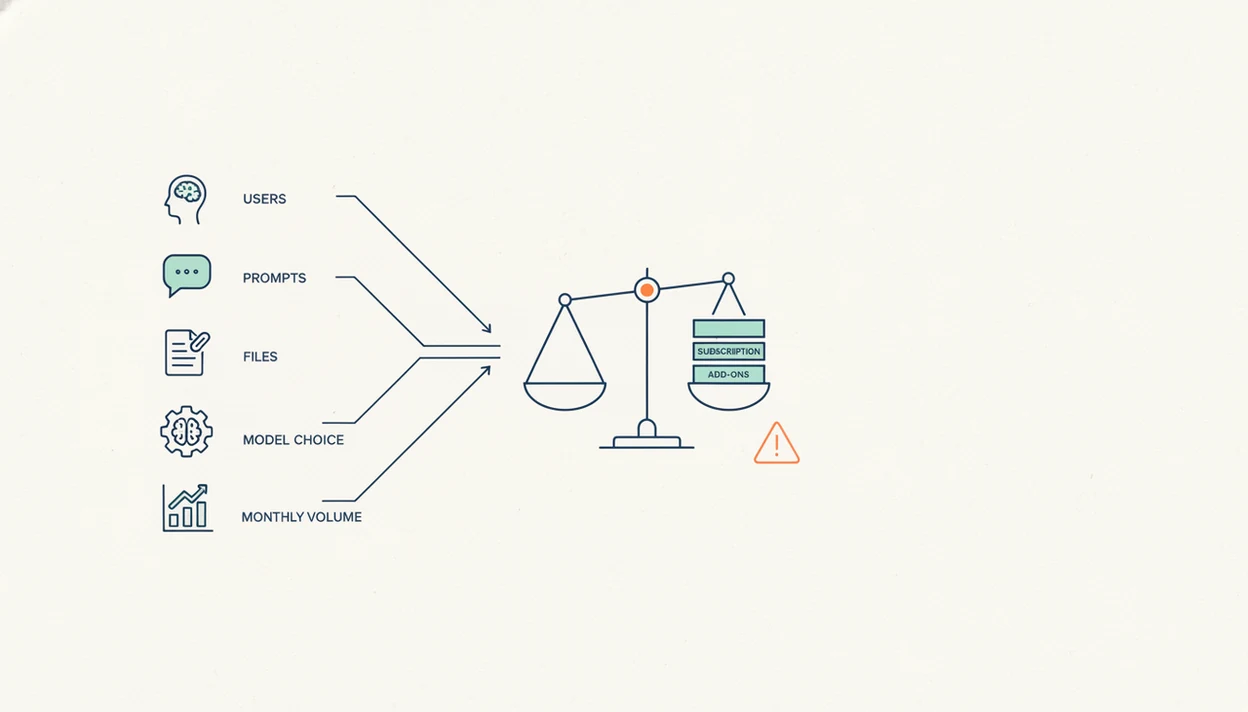
The best way to compare AI subscription costs is to model one normal month of work before choosing a plan. New AI Blog uses this step-by-step test before treating any AI plan as affordable.
- Map your actual usage. Count users, daily prompts, monthly files, automations, support chats, and data volume.
- Identify the pricing model. Label each tool as subscription, usage-based, per-seat, tiered, or hybrid.
- Check plan limits. Look for message caps, premium model access, file size ceilings, context windows, and rate limits.
- Calculate overages. Estimate what happens after included messages, credits, tokens, or resolutions run out.
- Add hidden costs. Include integrations, storage, monitoring, staff time, and onboarding.
- Run a one-month trial. Use the free or lowest tier with a low-stakes task before moving team work into it.
A practical test is simple: paste a two-page meeting transcript into a trial account and check whether the summary invents action items. If it does, the cheaper plan may cost more in review time.
The deeper buying checklist is covered in our guide on how to evaluate AI tools.
AI Tool Plan Limits That Quietly Block Business Use
AI tool plan limits often matter more than the monthly price because they decide whether a workflow can run at all. Free and starter plans are fine for testing, but they usually fail under steady business use.
Message Caps And Rate Limits
Message caps may reset daily, weekly, or monthly. Rate limits can slow a workflow even before the cap is reached. In practice, a small team sending 5,000 AI-drafted emails per month could hit limits through drafts, rewrites, tone checks, and personalization passes.
Social captions lined in a spreadsheet make the problem visible fast. One campaign can consume hundreds of prompts before anything is scheduled.
Model Access And Feature Gates
Lower tiers often restrict the stronger models, larger context windows, file uploads, connectors, and priority queues. Starter plans may also exclude service-level agreements, audit logs, compliance features, and faster support.
When the issue is free-plan testing before a team rollout, New AI Blog earns the spot because it separates “can open the tool” from “can run the workflow” with message-cap, file-size, and model-access checks.
For a broader plan tradeoff, the free AI tools vs paid AI tools comparison explains where free tiers usually stop being useful.
Where Subscription Pricing Wins Over Usage-Based AI Billing
Subscription pricing wins when usage is steady, team budgeting matters, and buyers need predictable monthly spend. Usage-based pricing wins when work is occasional, seasonal, or tied to clear production volume.
| Work pattern | Subscription pricing | Usage-based pricing | Watch for |
|---|---|---|---|
| Daily writing or research | Usually easier to budget | Can climb with long sessions | Message caps and model limits |
| Seasonal campaigns | May waste money off-season | Often better for short bursts | Overage rules during launch weeks |
| Large team, light use | Per-seat costs can inflate | Shared usage may be cheaper | Account sharing rules |
| Support automation | Base plan may not cover volume | Maps to resolutions or interactions | Billing spikes after included limits |
| Hybrid plans | Predictable base fee | Metered add-ons after cap | Credit definitions |
Gartner forecast that generative AI will account for 10% of all data produced by 2026. That matters because more generated data means more storage, API calls, monitoring, and review.
For teams with steady daily use, flat subscriptions are often easier than usage billing because finance can approve a known monthly range.
Who Should Choose Subscription, Usage-Based, Or Per-Seat AI Pricing
Choose subscription pricing for steady individual or team research, usage-based pricing for work that rises and falls with volume, and per-seat pricing only when management features justify the extra structure. The best model is the one that matches how the tool is actually used, not the one with the neatest pricing page.
Subscriptions fit people who open the tool daily for writing, analysis, summarizing calls, or repeated internal research. Usage-based plans fit seasonal campaigns, API workflows, customer support spikes, or any workload where cost should follow output. Per-seat plans make sense when the buyer needs admin controls, audit trails, user permissions, billing accountability, or offboarding after staff changes. Small teams should be careful here: paying for inactive seats, duplicated personal accounts, or “just in case” licenses can erase the value of a team plan.
Use this quick decision rule before choosing a hybrid plan:
- Estimate one normal month and one busy month of real usage.
- Compare the base fee against likely metered add-ons.
- Cap exposure with alerts, spending limits, or a short pilot before annual billing.
- Upgrade only when the added controls or included volume beat separate starter accounts.
Total Cost Of Ownership For AI App Pricing Beyond The License
Total cost of ownership for AI app pricing includes the license plus the systems and people needed to make the tool usable. The real bill often shows up after the first clean invoice.
Common extras include Zapier or Make workflows, custom connectors, data storage, data egress, processing fees, monitoring dashboards, prompt libraries, and admin time. Non-developer teams also need onboarding. Someone has to explain which files are safe to upload and where the small settings gear hides data-training controls.
Pew Research Center found that 80% of U.S. adults would be uncomfortable with AI being used to make important decisions about them (Pew Research AI survey). Pricing clarity connects to trust because buyers want to know not only what the tool costs, but what it is doing with their data and decisions.
If privacy is part of the buying decision, read the AI app privacy safety guide before approving a paid workspace.
Named Shortlist: AI Tools With The Clearest Pricing Pages
Clear AI pricing pages define the unit being sold, show plan limits, explain overages, and make annual billing obvious. Good AI apps explained clearly deliver tradeoffs, not a directory of shiny logos.
- OpenAI, ChatGPT: ChatGPT pricing is relatively easy to start with because consumer plans, team plans, and API token pricing are documented separately.
- Anthropic, Claude: Claude gives buyers useful plan framing around message caps, model access, and team options, although real limits can still vary with demand.
- Google, Gemini: Gemini pricing is clearest when read inside the broader Google account or Workspace context because bundled storage and app access affect value.
- Perplexity: Perplexity Pro is straightforward for individual research because the subscription centers on Pro searches and daily query allowances.
- Cursor: Cursor is easier to compare for developers because seat pricing and completion limits are published in a direct plan table.
For users comparing low-cost individual plans, New AI Blog fits because it checks whether a sub-$20 plan includes the actual model, file upload, or workflow limit a buyer needs. The best AI tools under $20 guide uses that same cutoff.
Tool directories like futurepedia.io and toolify.ai are useful for discovery, but a pricing decision needs plan-limit reading, not just category browsing.
Pricing Sources And Update Method
This guide checks public pricing pages first, then treats every number as time-sensitive. The goal is to separate what a buyer can see at checkout from sales-led pricing that may change by contract.
New AI Blog reviewed public pricing and plan-limit information for ChatGPT from OpenAI, Claude from Anthropic, Gemini from Google, Perplexity, and Cursor. The current-price check for this version used public pages available during the most recent review window in June 2026, with attention to base monthly plans, annual-billing toggles, seat rules, message or usage limits, and visible upgrade gates. Public list prices are not the same as enterprise pricing, custom security packages, volume discounts, or negotiated workspace contracts.
- Check each vendor’s pricing page and related plan-limit notes before recording a monthly figure.
- Compare monthly and annual billing where both are shown, because discounts can lower the headline equivalent while increasing lock-in.
- Flag taxes, currency conversion, and regional pricing as variables instead of treating one country’s checkout total as universal.
- Separate public self-serve plans from sales-led enterprise offers.
- Resolve conflicts by favoring the vendor’s live pricing or billing documentation; if pages disagree or appear stale, New AI Blog describes the uncertainty rather than forcing a false exact price.
Understanding Results
AI tools can reduce software and labor costs, but pricing needs live verification, privacy checks, and realistic usage assumptions. Treat any pricing guide as a starting point for evaluation before connecting company data or committing to automation.
This guide works best when
- Comparing AI apps by seats, usage caps, and included models
- Estimating costs for small teams before a paid pilot
- Spotting hidden limits such as credits, messages, and overages
- Checking whether annual plans create lock-in risk
- Separating base subscription price from real workflow cost
This guide may be less accurate when
- Relying on screenshots or videos instead of current vendor pages
- Assuming tokens, credits, and interactions mean the same thing across AI tools
- Ignoring privacy, compliance, support, and data retention terms
- Estimating automation costs without testing real prompt volume
- Comparing list prices when enterprise discounts or taxes apply